
Enhanced Conversions works by attaching the customer's email address to each conversion so Google can match it to a signed-in Google account. Google Ads reports how often that data actually arrives as a coverage figure, and warns you when it is low or falling. ProfitMetrics can supply that data in two different ways, and the fix depends entirely on which one your account uses.
On this page- The two ways Enhanced Conversions is set up
- What poor coverage means
- Checking a web setup
- Checking a Google Ads API setup
- Troubleshooting
The two ways Enhanced Conversions is set up
Before you troubleshoot anything, establish which method your account is using. The two methods get the customer's email address from completely different places, so the checks below only apply to one of them.
| Method | Where the email address comes from |
|---|---|
| Google tag/Google Tag Manager | The ProfitMetrics tag runs on your order confirmation page, picks up the customer's email address from that page, and passes it to Google Ads alongside the conversion. |
| Google Ads API | Enabled inside ProfitMetrics. ProfitMetrics sends the email address to Google Ads directly from its own servers, taken from the orders your shop has already sent to ProfitMetrics. Nothing is read from the browser. |
You can confirm the method Google Ads has on file under Goals > Settings > Enhanced conversions. Full setup instructions for both methods are in our guide to setting up Enhanced Conversions.
What poor coverage means
Coverage is the share of your conversions that reached Google Ads with usable customer data attached. A low or falling figure does not mean conversions have stopped being recorded — they are still arriving, but a growing number of them have no email address with them, so Google has nothing to match against. This normally isn't a critical issue, but to ensure you're sending Google the maximum amount of data possible, it's recommended that enhanced Conversions coverage is as high as possible.
A figure that has always been low points at a setup that was never completed correctly. A figure that was healthy and then dropped away over a day or two points at something on your shop changing on that date.
Below is an example of how the drop in Enhanced Conversions coverage might look:
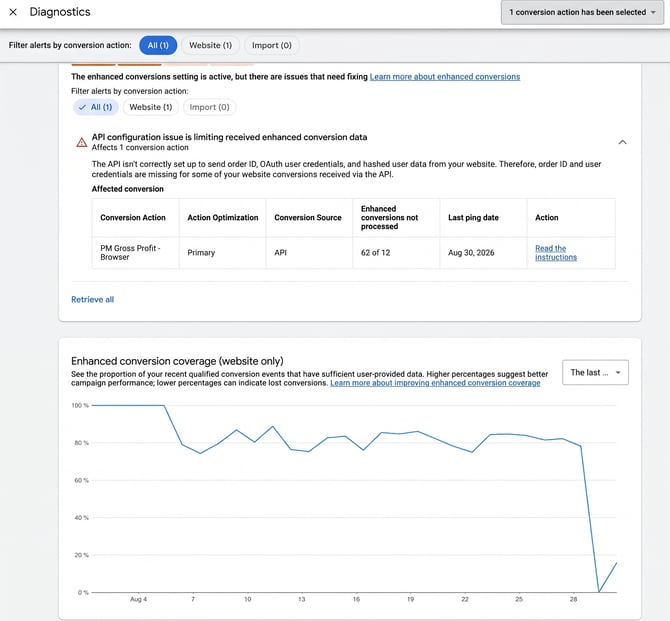
NOTE: Note the date the decline started before you go any further — it is the single most useful piece of evidence you have, and it usually lines up with a platform update, a theme change, or a new app on your checkout.
Checking a web setup
On a web setup, everything depends on the user-provided data address being present and readable on the order confirmation page at the moment the tag runs. If coverage has dropped, the information is either no longer on the page or is no longer in the place the tag was told to look. Two causes account for almost all cases.
| Cause | What has happened |
|---|---|
| The dataLayer changed | The dataLayer is the block of order information your shop publishes for tracking tags to read. A platform release, a theme update, or a new checkout app can rename the email field, move it, or stop including it. The tag then reads nothing where it used to find an address. |
| The page layout changed | Where the email address is not available in the dataLayer, it is often read straight off the visible confirmation page using a CSS selector — a rule that points at one specific element on the page. Redesign that page and the rule points at nothing. |
To check, place a test order and look at the confirmation page yourself. Confirm the customer's email address is actually shown or published on that page, then confirm the tag is picking it up rather than sending the conversion without it.
Checking a Google Ads API setup
On an API setup, the browser is not involved at all. ProfitMetrics sends the customer data to Google Ads from your orders, so if orders are not reaching ProfitMetrics there is nothing to send. This is by far the most common cause of poor coverage on this method, and it points at your integration rather than at anything in Google Ads.
Check for gaps in your incoming orders:
- Open your ProfitMetrics dashboard.
- Set the date range to the last 90 days.
- Look at the orders coming into ProfitMetrics across that period.
- You are looking for an unbroken line — orders arriving on every day your shop traded.
Any gap, or a drop to zero that never recovers, means orders have stopped reaching ProfitMetrics and your integration needs attention. Fix the flow of orders first. Coverage recovers on its own once orders are arriving again, though Google reports the figure over a trailing period, so allow a few days before the number reflects the fix.
If you are using our client-side integration (for example, our Google Tag Manager purchase tag), you also need to check that the customer email address is being sent to ProfitMetrics with the order from the order confirmation page.
NOTE: Compare the start of the gap in orders against the date your coverage started falling — if the two line up, you have found the cause and there is nothing to investigate on the Google Ads side.
Troubleshooting
| Symptom | Check |
|---|---|
| Coverage has been low since day one | The setup was never completed. Confirm Enhanced Conversions is switched on in both ProfitMetrics and Google Ads, and that the method recorded in Google Ads matches the way ProfitMetrics is actually sending the data. |
| Coverage dropped on a specific date, web setup | Find out what changed on your shop that day — a platform release, a theme update, a new checkout app — then place a test order and check the email address is still being read from the confirmation page. |
| Coverage dropped on a specific date, API setup | Check the last 30 days of orders in your ProfitMetrics dashboard for a gap. A break in incoming orders is the usual explanation. if you are using our client-side integration, please also check that the customer email address is still being sent correctly from the purchase tag. |
| Coverage is fine but conversion numbers look wrong | That is a separate issue. Enhanced Conversions only improves matching of conversions that are already being recorded. |
| Everything above checks out | Email support@profitmetrics.io with a screenshot of the warning, the date the coverage figure started falling, and the date range you are looking at. |