---
title: What to do if your conversion actions show a 'needs attention' warning
description: Google Ads 'Needs Attention' warning for ProfitMetrics
---
[Skip to content](https://knowledge.profitmetrics.io/what-to-do-if-your-offline-conversions-show-needs-attention#main-content)
[](https://knowledge.profitmetrics.io/?hsLang=en)
Open main navigation
Close main navigation
- [Contact Support](https://knowledge.profitmetrics.io/kb-ticket/new)
[Contact Support](https://knowledge.profitmetrics.io/kb-ticket/new?hsLang=en)
How can we help you?
- There are no suggestions because the search field is empty.
1. [Knowledge base](https://knowledge.profitmetrics.io/?hsLang=en)
2. [Ad Channels](https://knowledge.profitmetrics.io/ad-channels?hsLang=en)
3. [Google Ads](https://knowledge.profitmetrics.io/ad-channels?hsLang=en#google-ads)
# What to do if your conversion actions show a 'needs attention' warning
## Google Ads sometimes flags ProfitMetrics conversion actions with a "Needs Attention" warning in the Goals section. In most cases this is a false positive caused by how the ProfitMetrics checks and updates conversions through the Google Ads API. This article explains what triggers the alert, how to verify your setup is correct, and when to contact support.
---
#### **Quick Verification Checklist**
If you see a "Needs Attention" warning, verify these three items. If all three check out, the alert can be safely ignored.
| Check | What to Look For |
| --- | --- |
| **Conversion split** | Most conversions are recorded under **PM Revenue/Gross Profit - Browser**, with a smaller number under **PM Revenue/Gross Profit - Booster** |
| **Enhanced Conversions for Leads** | Enabled in Google Ads. Found in **Goals \> Settings \> Enhanced conversions for leads** |
| **Enhanced Conversions method** | Set to **API** if using a ProfitMetrics module, or **Google Tag Manager** if Conversion Booster is configured in GTM. Found in **Goals \> Settings \> Enhanced conversions** |
If you believe there is still an issue after reading below, please reach out to [support@ProfitMetrics.io](mailto:support@ProfitMetrics.io) with screenshots of the error message, along with the conversion actions table under **Goals \> Summary** (including the date range)
#### **Why these alerts appear**
Below are some examples of common alerts and the reasons for them
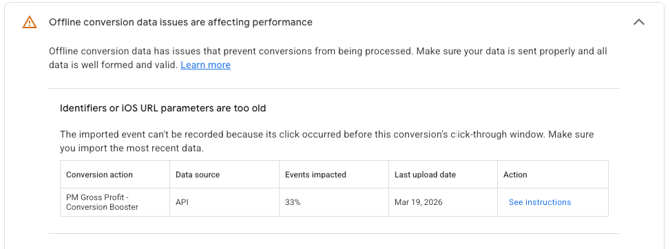
**"Identifiers or iOS URL parameters are too old"**
This can occur when the click time is beyond the click-through conversion window. ProfitMetrics sends every order and every Google click ID to Google Ads, without knowing when this click occurred. It's therefore quite common to see this error, particularly with shorter click-through conversion windows.
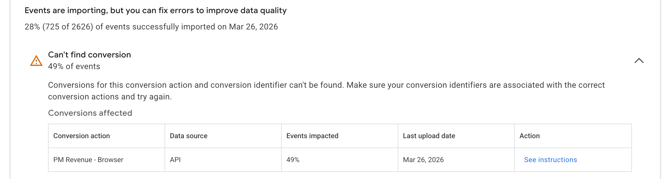
**"Can't find conversions"**
When a conversion occurs, ProfitMetrics first attempts to match it against the **PM Revenue/Gross Profit Browser** conversion actions. If the order was not originally tracked by the browser conversion action, the API update call returns an error. This error is expected — it tells the system to route the conversion to the **PM Revenue/Gross Profit Booster** conversion action instead. Google Ads surfaces these expected errors as warnings.
Also, if one or more websites are connected to multiple Google Ads accounts, ProfitMetrics sends all conversions from a website to every connected account. When a conversion belongs to one account but not the others, the update attempts against the non-matching accounts generate additional warnings.
**"No attempted imports with user-provided data"**

Enhanced Conversions requires a customer email to match conversions. If no email is included with order data sent to ProfitMetrics, the enhanced conversion match will fail and trigger an alert. This primarily affects sites using the **Universal Integration (client-side or server-side)** where sending of the customer email may not be configured.
**''Cost of goods sold (COGS) is not available for all products sold in recent conversions''**
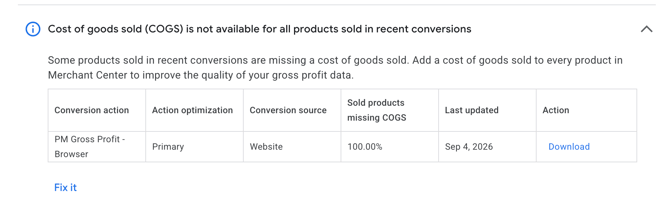
This alert triggers when one or more products involved in recent conversions lack Cost of Goods Sold (COGS) data. Because ProfitMetrics relies on this data to calculate profitability, missing metrics will generate a warning. To resolve this and improve the accuracy of your gross profit reporting, log into your Google Merchant Center account and ensure a valid COGS value is assigned to every product in your feed. - This is still not supported on our GrossProfit Conversion Actions, only on Revenue.
This can also occur if Enhanced Conversions isn't configured correctly in ProfitMetrics.
1. Navigate to **Integrations \> Connections \> Conversion Booster for Google Ads**.
2. Confirm Enhanced Conversions is enabled and the correct Google Ads account is connected.
**We are aware that this can give a false impression that something is wrong, and we are gradually rolling out an update to the ProfitMetrics integrations which we hope will eliminate these alerts.**
These alerts are generally good, indicating that the Conversion Booster for Google Ads is working exactly as intended.
- [Getting Started](https://knowledge.profitmetrics.io/getting-started?hsLang=en#main-content)
- [Learn the Basics](https://knowledge.profitmetrics.io/getting-started?hsLang=en#learn-the-basics)
- [Prepare for Onboarding](https://knowledge.profitmetrics.io/getting-started?hsLang=en#prepare-for-onboarding)
- [Account Setup](https://knowledge.profitmetrics.io/getting-started?hsLang=en#account-setup)
- [E-commerce Platforms](https://knowledge.profitmetrics.io/e-commerce-platforms?hsLang=en#main-content)
- [Shopify](https://knowledge.profitmetrics.io/e-commerce-platforms?hsLang=en#shopify)
- [WooCommerce](https://knowledge.profitmetrics.io/e-commerce-platforms?hsLang=en#woocommerce)
- [Magento](https://knowledge.profitmetrics.io/e-commerce-platforms?hsLang=en#magento)
- [PrestaShop](https://knowledge.profitmetrics.io/e-commerce-platforms?hsLang=en#prestashop)
- [BigCommerce](https://knowledge.profitmetrics.io/e-commerce-platforms?hsLang=en#bigcommerce)
- [Shopware](https://knowledge.profitmetrics.io/e-commerce-platforms?hsLang=en#shopware)
- [DanDomain & Related](https://knowledge.profitmetrics.io/e-commerce-platforms?hsLang=en#dandomain-related)
- [Universal Integration (Clientside)](https://knowledge.profitmetrics.io/e-commerce-platforms?hsLang=en#universal-integration-clientside)
- [Universal Integration (Server-side Hybrid)](https://knowledge.profitmetrics.io/e-commerce-platforms?hsLang=en#universal-integration-server-side-hybrid)
- [Other Platforms](https://knowledge.profitmetrics.io/e-commerce-platforms?hsLang=en#other-platforms)
- [Developer Documentation](https://knowledge.profitmetrics.io/e-commerce-platforms?hsLang=en#developer-documentation)
- [Ad Channels](https://knowledge.profitmetrics.io/ad-channels?hsLang=en#main-content)
- [Google Ads](https://knowledge.profitmetrics.io/ad-channels?hsLang=en#google-ads)
- [Meta (Facebook/Instagram)](https://knowledge.profitmetrics.io/ad-channels?hsLang=en#meta-facebook-instagram)
- [Microsoft Bing Ads](https://knowledge.profitmetrics.io/ad-channels?hsLang=en#microsoft-bing-ads)
- [Google Analytics 4](https://knowledge.profitmetrics.io/ad-channels?hsLang=en#google-analytics-4)
- [Partner-ads](https://knowledge.profitmetrics.io/ad-channels?hsLang=en#partner-ads)
- [Other Channel Configuration](https://knowledge.profitmetrics.io/ad-channels?hsLang=en#other-channel-configuration)
- [Tracking & Conversion Setup](https://knowledge.profitmetrics.io/tracking-conversion-setup?hsLang=en#main-content)
- [Overview](https://knowledge.profitmetrics.io/tracking-conversion-setup?hsLang=en#overview)
- [Conversion Booster for Google Ads](https://knowledge.profitmetrics.io/tracking-conversion-setup?hsLang=en#conversion-booster-for-google-ads)
- [Conversion Booster for Meta](https://knowledge.profitmetrics.io/tracking-conversion-setup?hsLang=en#conversion-booster-for-meta)
- [Conversion Booster Custom Pixels](https://knowledge.profitmetrics.io/tracking-conversion-setup?hsLang=en#conversion-booster-custom-pixels)
- [Enhanced Conversions](https://knowledge.profitmetrics.io/tracking-conversion-setup?hsLang=en#enhanced-conversions)
- [Shopping Booster](https://knowledge.profitmetrics.io/shopping-booster?hsLang=en#main-content)
- [Overview & Setup](https://knowledge.profitmetrics.io/shopping-booster?hsLang=en#overview-setup)
- [Supplemental Feeds](https://knowledge.profitmetrics.io/shopping-booster?hsLang=en#supplemental-feeds)
- [Campaigns & Labels](https://knowledge.profitmetrics.io/shopping-booster?hsLang=en#campaigns-labels)
- [Troubleshooting](https://knowledge.profitmetrics.io/shopping-booster?hsLang=en#troubleshooting)
- [Product Feed & Costs](https://knowledge.profitmetrics.io/product-feed-costs?hsLang=en#main-content)
- [Product Feed](https://knowledge.profitmetrics.io/product-feed-costs?hsLang=en#product-feed)
- [Shipping & Payment Costs](https://knowledge.profitmetrics.io/product-feed-costs?hsLang=en#shipping-payment-costs)
- [Expenses](https://knowledge.profitmetrics.io/product-feed-costs?hsLang=en#expenses)
- [Dashboard, Orders & Reporting](https://knowledge.profitmetrics.io/dashboard-orders-reporting?hsLang=en#main-content)
- [Dashboard & Orders](https://knowledge.profitmetrics.io/dashboard-orders-reporting?hsLang=en#dashboard-orders)
- [Looker Studio](https://knowledge.profitmetrics.io/dashboard-orders-reporting?hsLang=en#looker-studio)
- [Google BigQuery](https://knowledge.profitmetrics.io/dashboard-orders-reporting?hsLang=en#google-bigquery)
- [Account & Billing](https://knowledge.profitmetrics.io/account-billing?hsLang=en#main-content)
- [Users & Access](https://knowledge.profitmetrics.io/account-billing?hsLang=en#users-access)
- [Billing & Invoices](https://knowledge.profitmetrics.io/account-billing?hsLang=en#billing-invoices)
- [Privacy & Consent](https://knowledge.profitmetrics.io/privacy-consent?hsLang=en#main-content)
- [GDPR](https://knowledge.profitmetrics.io/privacy-consent?hsLang=en#gdpr)
- [Consent Management Platforms](https://knowledge.profitmetrics.io/privacy-consent?hsLang=en#consent-management-platforms)
- [Google Consent Mode](https://knowledge.profitmetrics.io/privacy-consent?hsLang=en#google-consent-mode)
- [For Agencies](https://knowledge.profitmetrics.io/for-agencies?hsLang=en#main-content)
- [Getting Started as an Agency](https://knowledge.profitmetrics.io/for-agencies?hsLang=en#getting-started-as-an-agency)
- [Agency Certification](https://knowledge.profitmetrics.io/for-agencies?hsLang=en#agency-certification)
- [Shopify](https://knowledge.profitmetrics.io/shopify?hsLang=en)
- [PrestaShop](https://knowledge.profitmetrics.io/prestashop?hsLang=en)
- [Google Ads](https://knowledge.profitmetrics.io/google-ads?hsLang=en#main-content)
- [troubleshoot](https://knowledge.profitmetrics.io/google-ads?hsLang=en#troubleshoot)
- [Meta (Facebook / Instagram)](https://knowledge.profitmetrics.io/meta-facebook-instagram?hsLang=en)
- [Uncategorized](https://knowledge.profitmetrics.io/uncategorized?hsLang=en)
- [Billing](https://knowledge.profitmetrics.io/billing?hsLang=en)
- [Google Sheets](https://knowledge.profitmetrics.io/google-sheets?hsLang=en)
- [Account](https://knowledge.profitmetrics.io/account?hsLang=en)
- [Ideal Shop](https://knowledge.profitmetrics.io/ideal-shop?hsLang=en)
[](https://profitmetrics.io)
[mailto:support@profitmetrics.io](mailto:support@profitmetrics.io)
Copyright © 2026, ProfitMetrics ApS