
If your ProfitMetrics custom events — or any Meta custom events — are no longer available as optimisation events when you create a Sales campaign, the problem is usually not with your tracking.
Meta has introduced a new review process inside Events Manager, and until a custom event has been reviewed and approved there, it will not show up as an option for campaign optimisation. Meta did not communicate this change clearly, so it can look as though custom events have stopped working. In most cases this is a quick fix, and this article walks through why it happens and how to resolve it.
Why is this happening?
Meta has added a new Event Blocking Review process under Data Controls in Events Manager. If your custom events have not yet been reviewed, they can still be received correctly inside Events Manager, but they will not appear as available optimisation events when you create or edit a campaign. In other words, the data is arriving as expected — it simply hasn't been approved for use in optimisation yet.
This affects both optimisation types:
Maximise Conversions
NOTE: Custom events won't be selectable as the conversion event until reviewed.
Value Optimisation (Value-Based Bidding)
NOTE: Custom events won't be available for value-based bidding until reviewed.
How to fix it
Before you begin, make sure you have Full Control (Admin) access to the Meta Business account and the Dataset (Pixel). Without the required permissions, you may not be able to access the Data Controls section or review the events.
Follow the steps below for each Meta Dataset (Pixel) that contains your custom events.
Step 1:
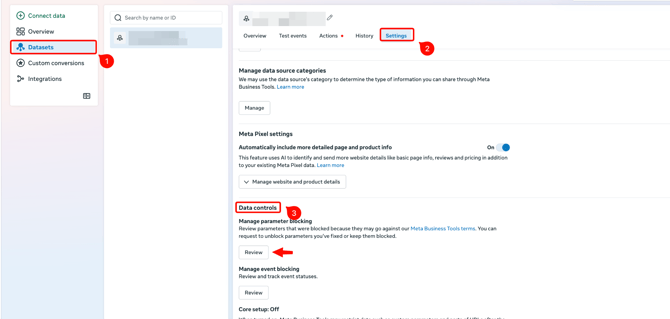
Open Meta Events Manager. From the left-hand menu, select Datasets and choose the dataset that contains your custom events.
Step 2:
Open the Settings tab.
Step 3:
Scroll down to Data Controls. Under Manage Event Blocking, click Review.
Step 4:
Review the events listed by Meta and confirm or approve your custom events. Once done, Meta will make those events eligible for campaign optimisation again.
Repeat for every dataset. If you use more than one Meta Dataset (Pixel), run through these steps separately for each one — approving events on one dataset does not carry over to the others.
Use the screenshot below as a reference for where to find the setting.
After completing the review
Once the review is complete, your custom events should become available again when you create or edit campaigns. You should now be able to select them as optimisation events for Sales campaigns, Maximise Conversions, and Value Based Bidding. In most cases the change is reflected shortly after the review is completed.
Troubleshooting
If you've completed the review and your events are still unavailable, work through the checks below:
Events still missing after review
-
Confirm the custom events are actively being received in Events Manager, not just configured.
Can't find the events at all
-
Make sure you're looking at the correct Dataset (Pixel) — events approved on one dataset won't appear under another.
Review done but nothing has changed yet
-
Allow a short amount of time for Meta to process the update before concluding it hasn't worked.
Issue persists
-
Contact the ProfitMetrics Support team so we can help investigate further.