---
title: HOW TO SET UP SHOPPING BOOSTER FOR GOOGLE ADS
description: Please use the following guide to help prepare for and configure the Shopping Booster.
---
[Skip to content](https://knowledge.profitmetrics.io/how-to-set-up-shopping-booster-for-google-ads#main-content)
[](https://knowledge.profitmetrics.io/?hsLang=en)
Open main navigation
Close main navigation
- [Contact Support](https://knowledge.profitmetrics.io/kb-ticket/new)
[Contact Support](https://knowledge.profitmetrics.io/kb-ticket/new?hsLang=en)
How can we help you?
- There are no suggestions because the search field is empty.
1. [Knowledge base](https://knowledge.profitmetrics.io/?hsLang=en)
2. [Shopping Booster](https://knowledge.profitmetrics.io/shopping-booster?hsLang=en)
3. [Overview & Setup](https://knowledge.profitmetrics.io/shopping-booster?hsLang=en#overview-setup)
# HOW TO SET UP SHOPPING BOOSTER FOR GOOGLE ADS
## Please use the following guide to help prepare for and configure the Shopping Booster
---
[Next Steps if you have already completed this guide](https://knowledge.profitmetrics.io/how-to-set-up-shopping-booster-for-google-ads#nextsteps)
---
### How to Set Up the Shopping Booster
#### Follow the steps below to set up Shopping Booster for Google Ads
***Important**: It's very important that the Google Mail account you have connected with Google Ads in ProfitMetrics ALSO has admin access to the Merchant Center*
1. Integrations \> Connections \> [Shopping Booster for Google Ads](https://my.profitmetrics.io/customer/shopping-booster.php)
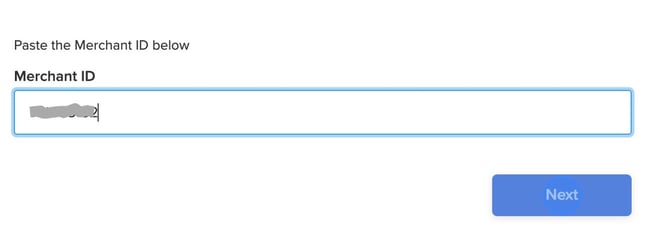
2. *Go to Google Merchant Center and copy the Merchant ID in the top left corner next to the account name.
*
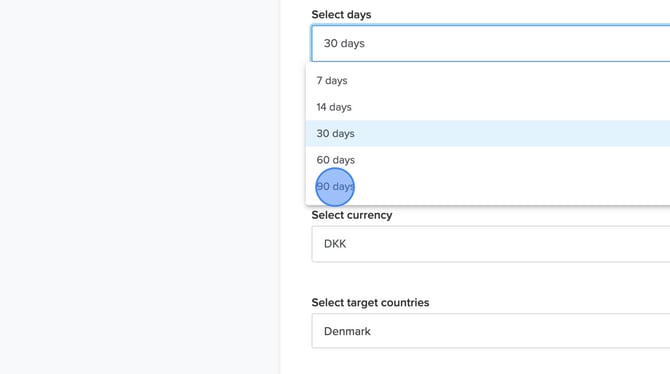
3. Ensure that you select a lookback window for performance data from Google Ads that is longer than the conversion actions window set in Google Ads. We suggest a duration of 90 days to gather comprehensive insights and optimize your campaigns effectively.
*NOTE: Exclude atypical periods, such as sales and seasonal peaks, by using a shorter lookback window when analyzing your performance.*
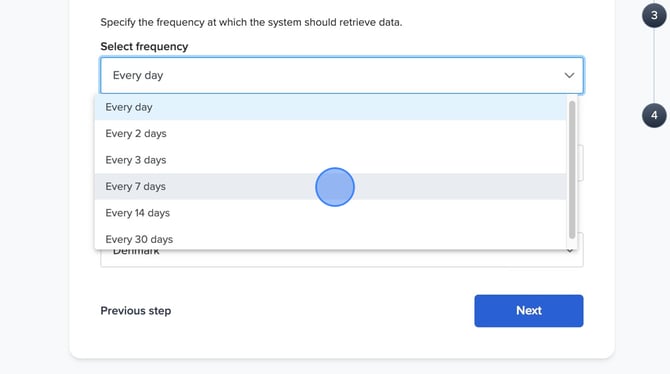
4. Select the frequency for how often the automation should run. We recommend setting this to "**Every 7 days**".
*NOTE: Setting this to "Every day", may result in products shifting between campaigns daily, which could affect the effectiveness of Google's smart bidding algorithm.*
**
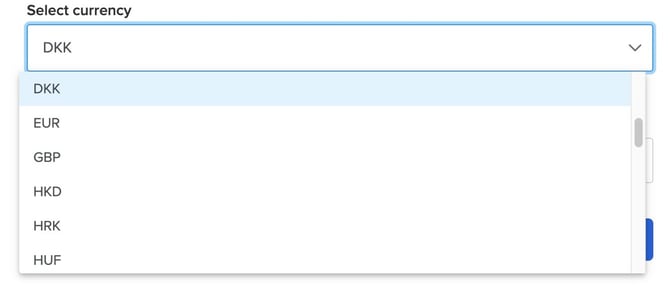
5. Select **currency.** Make sure to use the same currency used in your Google Ads account.
****
6. Select the **target countries** for the Google Ads account.*NOTE: You can only generate one feed per website in ProfitMetrics. If you have multiple countries connected on the same website we recommend selecting all of them*
**.png?width=670&height=375&name=How%20to%20Set%20Up%20Shopping%20Booster%20for%20Google%20Ads%20-%20Step%206%20(2).png)**
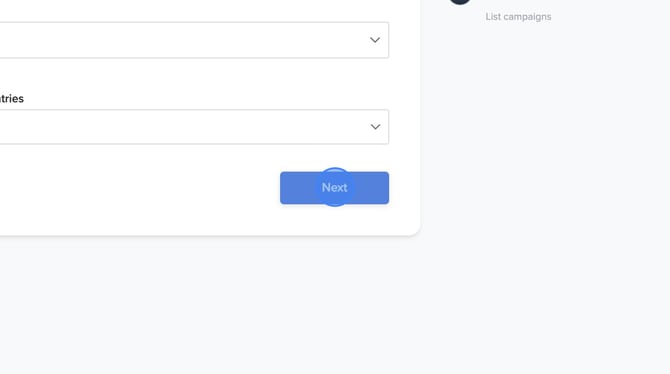
7. Click "**Next**"
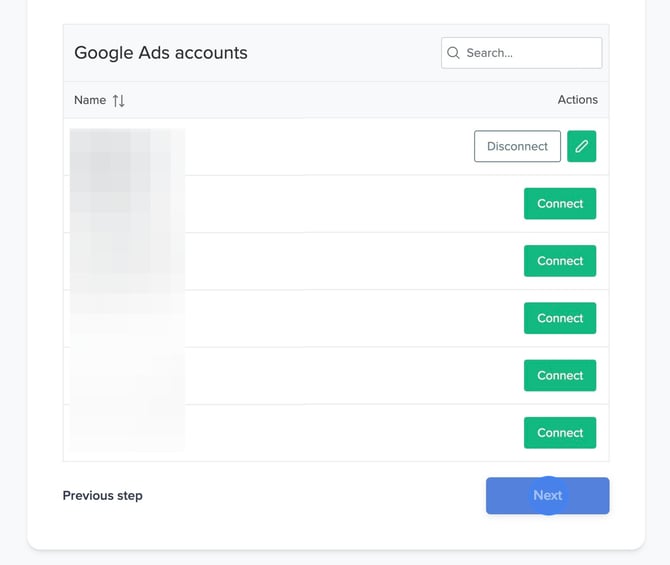
8. Select the **Google Ads account** from which you want the Shopping Booster to fetch product performance data. Then click "**Next**"
**NOTE**: You can select multiple accounts, but each account needs to be associated with the same Merchant Center ID added in Step 2.
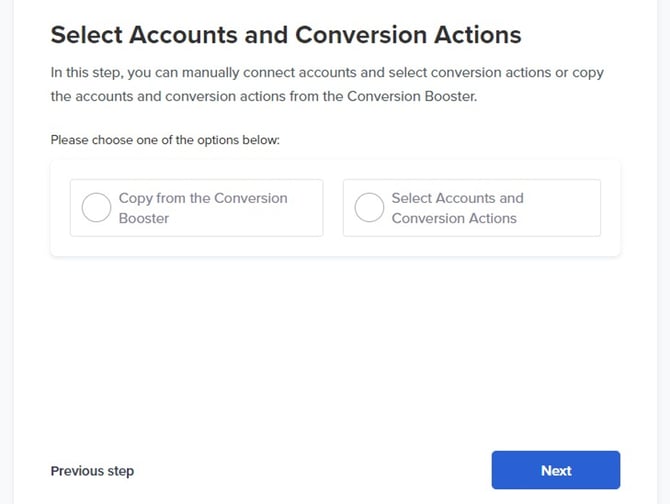
9. We recommend selecting the option to **Copy from the Conversion Booster**, but you can also choose to manually **Select Accounts and Conversion Actions**. If you don't copy from the Conversion Booster, please note that if you don't select Profit tracking conversion actions, you will only be able to select Revenue actions later. Once selected, click "**Next**".
**
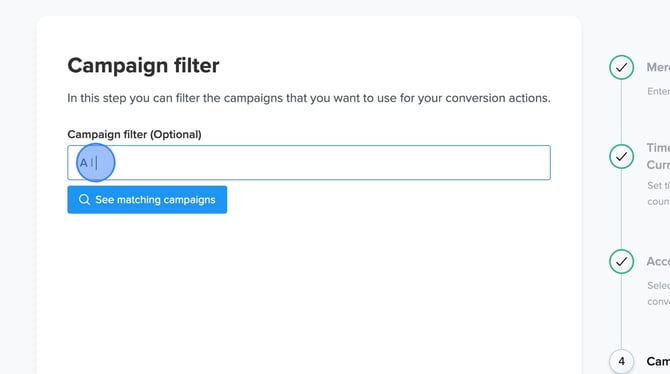
10. ***Optional***: You can set a campaign filter for the Shopping Booster. This allows you to choose which campaigns' data should be included in the Booster. For example, if you have shopping campaigns that exclude your brand, you can apply the rules only to those campaigns. The filter operates on an inclusion basis, meaning any campaign names that contain the specified characters (case insensitive) will be included in the data used by the Shopping Booster. If you want to include all campaigns, simply leave the filter blank.
Set your "**Campaign filter"** or leave it blank intentionally, then click '**NEXT**'
**
11. Click "**Finish**"
*.png?width=670&height=375&name=How%20to%20Set%20Up%20Shopping%20Booster%20for%20Google%20Ads%20-%20Step%2011%20(1).png)*
---
**Congratulations!** You have successfully set up the Shopping Booster.
Click "**Go to Shopping Booster**" to begin setting up your automations.
You can access the feed output below.
We have several options to choose from:
1. **Supplementary feed XML:** Contains G:id and custom labels.
2. **Full feed XML:** contains all data.
3. **Supplementary CSV file:** contains G:id and custom labels.
4. **Full CSV data file:** contains all data..
**Always use the "Supplementary feed XML" in the merchant center**
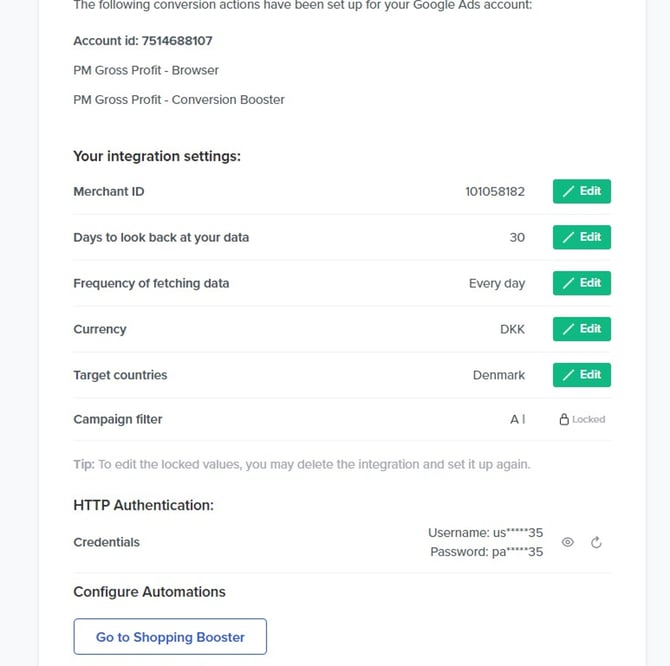
As this data could be sensitive, we have implemented HTTP authentication by default. We will automatically create a random user ID and password. If you wish to change it, you can always generate a new one. These credentials need to be added in the Google Merchant Center, for Google to read the files. Alternatively, if you are using the data in a feed management tool, you can add the HTTP username and password in the third-party tool to enable file access.
*NOTE: You can always go back to this settings page and change your choices if you need to modify the lookback window, frequency, etc.*
---
**Next Parts**
1. [How to add a supplemental feed to Google Merchant Center](https://knowledge.profitmetrics.io/how-to-add-a-supplemental-feed-to-google-merchant-center?hsLang=en)
2. [How to Set Up Campaigns in Google Ads with Shopping Booster's Custom Labels](https://knowledge.profitmetrics.io/how-to-use-shopping-booster-in-google-ads?hsLang=en)
- [Getting Started](https://knowledge.profitmetrics.io/getting-started?hsLang=en#main-content)
- [Learn the Basics](https://knowledge.profitmetrics.io/getting-started?hsLang=en#learn-the-basics)
- [Prepare for Onboarding](https://knowledge.profitmetrics.io/getting-started?hsLang=en#prepare-for-onboarding)
- [Account Setup](https://knowledge.profitmetrics.io/getting-started?hsLang=en#account-setup)
- [E-commerce Platforms](https://knowledge.profitmetrics.io/e-commerce-platforms?hsLang=en#main-content)
- [Shopify](https://knowledge.profitmetrics.io/e-commerce-platforms?hsLang=en#shopify)
- [WooCommerce](https://knowledge.profitmetrics.io/e-commerce-platforms?hsLang=en#woocommerce)
- [Magento](https://knowledge.profitmetrics.io/e-commerce-platforms?hsLang=en#magento)
- [PrestaShop](https://knowledge.profitmetrics.io/e-commerce-platforms?hsLang=en#prestashop)
- [BigCommerce](https://knowledge.profitmetrics.io/e-commerce-platforms?hsLang=en#bigcommerce)
- [Shopware](https://knowledge.profitmetrics.io/e-commerce-platforms?hsLang=en#shopware)
- [DanDomain & Related](https://knowledge.profitmetrics.io/e-commerce-platforms?hsLang=en#dandomain-related)
- [Universal Integration (Clientside)](https://knowledge.profitmetrics.io/e-commerce-platforms?hsLang=en#universal-integration-clientside)
- [Universal Integration (Server-side Hybrid)](https://knowledge.profitmetrics.io/e-commerce-platforms?hsLang=en#universal-integration-server-side-hybrid)
- [Other Platforms](https://knowledge.profitmetrics.io/e-commerce-platforms?hsLang=en#other-platforms)
- [Developer Documentation](https://knowledge.profitmetrics.io/e-commerce-platforms?hsLang=en#developer-documentation)
- [Ad Channels](https://knowledge.profitmetrics.io/ad-channels?hsLang=en#main-content)
- [Google Ads](https://knowledge.profitmetrics.io/ad-channels?hsLang=en#google-ads)
- [Meta (Facebook/Instagram)](https://knowledge.profitmetrics.io/ad-channels?hsLang=en#meta-facebook-instagram)
- [Microsoft Bing Ads](https://knowledge.profitmetrics.io/ad-channels?hsLang=en#microsoft-bing-ads)
- [Google Analytics 4](https://knowledge.profitmetrics.io/ad-channels?hsLang=en#google-analytics-4)
- [Partner-ads](https://knowledge.profitmetrics.io/ad-channels?hsLang=en#partner-ads)
- [Other Channel Configuration](https://knowledge.profitmetrics.io/ad-channels?hsLang=en#other-channel-configuration)
- [Tracking & Conversion Setup](https://knowledge.profitmetrics.io/tracking-conversion-setup?hsLang=en#main-content)
- [Overview](https://knowledge.profitmetrics.io/tracking-conversion-setup?hsLang=en#overview)
- [Conversion Booster for Google Ads](https://knowledge.profitmetrics.io/tracking-conversion-setup?hsLang=en#conversion-booster-for-google-ads)
- [Conversion Booster for Meta](https://knowledge.profitmetrics.io/tracking-conversion-setup?hsLang=en#conversion-booster-for-meta)
- [Conversion Booster Custom Pixels](https://knowledge.profitmetrics.io/tracking-conversion-setup?hsLang=en#conversion-booster-custom-pixels)
- [Enhanced Conversions](https://knowledge.profitmetrics.io/tracking-conversion-setup?hsLang=en#enhanced-conversions)
- [Shopping Booster](https://knowledge.profitmetrics.io/shopping-booster?hsLang=en#main-content)
- [Overview & Setup](https://knowledge.profitmetrics.io/shopping-booster?hsLang=en#overview-setup)
- [Supplemental Feeds](https://knowledge.profitmetrics.io/shopping-booster?hsLang=en#supplemental-feeds)
- [Campaigns & Labels](https://knowledge.profitmetrics.io/shopping-booster?hsLang=en#campaigns-labels)
- [Troubleshooting](https://knowledge.profitmetrics.io/shopping-booster?hsLang=en#troubleshooting)
- [Product Feed & Costs](https://knowledge.profitmetrics.io/product-feed-costs?hsLang=en#main-content)
- [Product Feed](https://knowledge.profitmetrics.io/product-feed-costs?hsLang=en#product-feed)
- [Shipping & Payment Costs](https://knowledge.profitmetrics.io/product-feed-costs?hsLang=en#shipping-payment-costs)
- [Expenses](https://knowledge.profitmetrics.io/product-feed-costs?hsLang=en#expenses)
- [Dashboard, Orders & Reporting](https://knowledge.profitmetrics.io/dashboard-orders-reporting?hsLang=en#main-content)
- [Dashboard & Orders](https://knowledge.profitmetrics.io/dashboard-orders-reporting?hsLang=en#dashboard-orders)
- [Looker Studio](https://knowledge.profitmetrics.io/dashboard-orders-reporting?hsLang=en#looker-studio)
- [Google BigQuery](https://knowledge.profitmetrics.io/dashboard-orders-reporting?hsLang=en#google-bigquery)
- [Account & Billing](https://knowledge.profitmetrics.io/account-billing?hsLang=en#main-content)
- [Users & Access](https://knowledge.profitmetrics.io/account-billing?hsLang=en#users-access)
- [Billing & Invoices](https://knowledge.profitmetrics.io/account-billing?hsLang=en#billing-invoices)
- [Privacy & Consent](https://knowledge.profitmetrics.io/privacy-consent?hsLang=en#main-content)
- [GDPR](https://knowledge.profitmetrics.io/privacy-consent?hsLang=en#gdpr)
- [Consent Management Platforms](https://knowledge.profitmetrics.io/privacy-consent?hsLang=en#consent-management-platforms)
- [Google Consent Mode](https://knowledge.profitmetrics.io/privacy-consent?hsLang=en#google-consent-mode)
- [For Agencies](https://knowledge.profitmetrics.io/for-agencies?hsLang=en#main-content)
- [Getting Started as an Agency](https://knowledge.profitmetrics.io/for-agencies?hsLang=en#getting-started-as-an-agency)
- [Agency Certification](https://knowledge.profitmetrics.io/for-agencies?hsLang=en#agency-certification)
- [Shopify](https://knowledge.profitmetrics.io/shopify?hsLang=en)
- [PrestaShop](https://knowledge.profitmetrics.io/prestashop?hsLang=en)
- [Google Ads](https://knowledge.profitmetrics.io/google-ads?hsLang=en#main-content)
- [troubleshoot](https://knowledge.profitmetrics.io/google-ads?hsLang=en#troubleshoot)
- [Meta (Facebook / Instagram)](https://knowledge.profitmetrics.io/meta-facebook-instagram?hsLang=en)
- [Shopping Booster for Google Ads](https://knowledge.profitmetrics.io/shopping-booster-for-google-ads?hsLang=en)
- [Uncategorized](https://knowledge.profitmetrics.io/uncategorized?hsLang=en)
- [Billing](https://knowledge.profitmetrics.io/billing?hsLang=en)
- [Google Sheets](https://knowledge.profitmetrics.io/google-sheets?hsLang=en)
- [Account](https://knowledge.profitmetrics.io/account?hsLang=en)
- [Ideal Shop](https://knowledge.profitmetrics.io/ideal-shop?hsLang=en)
- [Returns](https://knowledge.profitmetrics.io/returns?hsLang=en)
[](https://profitmetrics.io)
[mailto:support@profitmetrics.io](mailto:support@profitmetrics.io)
Copyright © 2026, ProfitMetrics ApS