---
title: How to set up the integration with Golden Planet
description: Follow the steps below to set up the integration with Golden planet
---
[Skip to content](https://knowledge.profitmetrics.io/how-to-set-up-integration-with-golden-planet#main-content)
[](https://knowledge.profitmetrics.io/?hsLang=en)
Open main navigation
Close main navigation
- [Contact Support](https://knowledge.profitmetrics.io/kb-ticket/new)
[Contact Support](https://knowledge.profitmetrics.io/kb-ticket/new?hsLang=en)
How can we help you?
- There are no suggestions because the search field is empty.
1. [Knowledge base](https://knowledge.profitmetrics.io/?hsLang=en)
2. [E-commerce Platforms](https://knowledge.profitmetrics.io/e-commerce-platforms?hsLang=en)
3. [Other Platforms](https://knowledge.profitmetrics.io/e-commerce-platforms?hsLang=en#other-platforms)
# How to set up the integration with Golden Planet
## Follow the steps below to set up the integration with Golden planet
Part 1: [Check Website URL in ProfitMetrics](https://knowledge.profitmetrics.io/how-to-set-up-integration-with-golden-planet#part1)
Part 2: [Create a new API Client](https://knowledge.profitmetrics.io/how-to-set-up-integration-with-golden-planet#part2)
Part 3: [Insert ProfitMetrics script](https://knowledge.profitmetrics.io/how-to-set-up-integration-with-golden-planet#part3)
Part 4: [Create a Product Feed](https://knowledge.profitmetrics.io/how-to-set-up-integration-with-golden-planet#part4)
### Part 1: Check website URL in ProfitMetrics
1. Log in to [https://my.profitmetrics.io/](https://my.profitmetrics.io/)
2. Go to "Websites"
3. Ensure the URL matches the actual URL of your websites domain.
Most likely it needs to be **example.com** instead of **www.example.com**
### Part 2: Create a new API Client
1. Log in to your Golden Planet admin panel
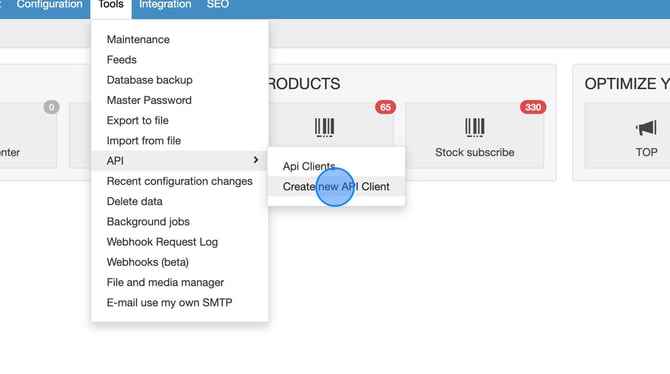
2. Navigate to **Tools \> API \> Create new API Client
**
3. Type **"profitmetrics"** in the title
**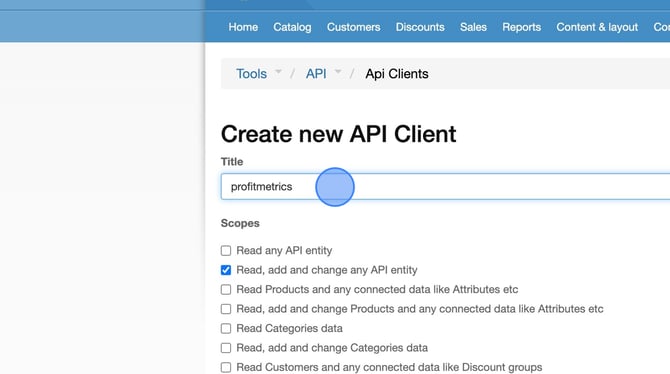**
4. **"Read, add and change any API entity"** is checked by default. If you want to change this you need to ensure that **"Read Customers and any connected data like Discount groups"** and **"Read Orders and any connected data like Order statuses"** are checked.
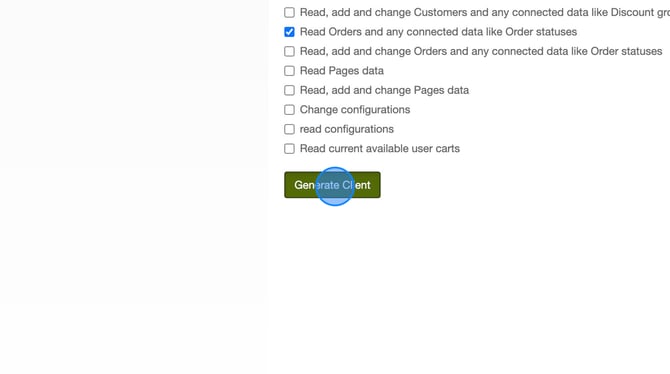
5. Click **Generate Client**
6. Copy the **"API Client ID"** and **"API Client Secret"** and send them to [support@profitmetrics.io.](mailto:support@profitmetrics.io)
We will then create a ticket for dev support to enable.
Template - replace \<**data**\> with appropriate information for your site:
1. > Hello ProfitMetrics
> Please see below for the API client/key information for \<**website**\> on GoldenPlanet.
> Please let me know when this has been configured so I can proceed and add the necessary scripts to my site.
>
> Client API Key:\<**Client ID**\>
> Client API Secret:\<**Client Secret**\>
### Part 3: Insert ProfitMetrics script
1. Log in to your Golden Planet admin panel
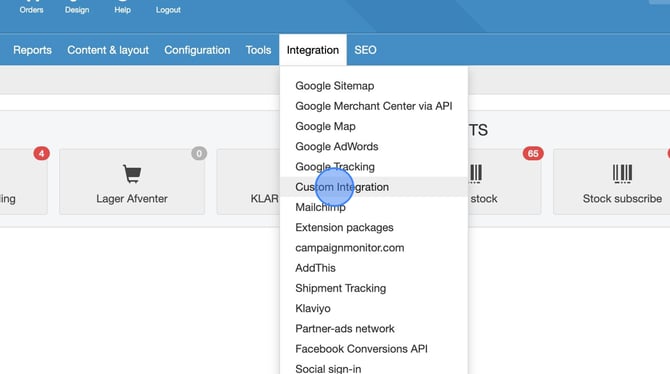
2. Navigate to **Integration \> Custom integration
**
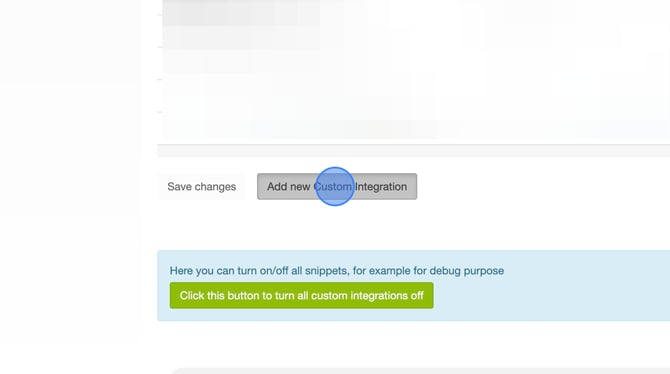
3. Click **Add new Custom integration** at the bottom of the page
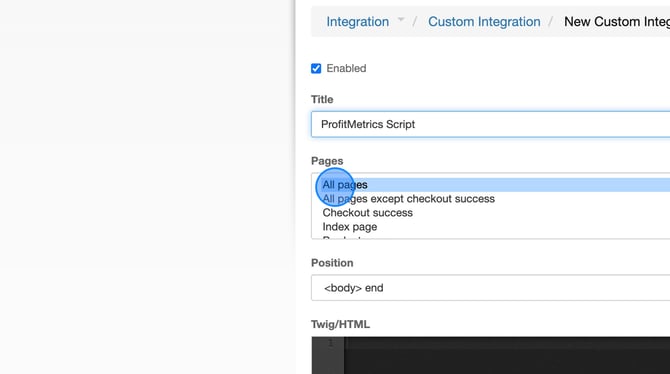
4. Type **"ProfitMetrics Script"** in the Title field.
5. Under Pages, select **All pages
**
6. Copy and paste **the following script into the Twig/HTML field. Make sure to update INSERT\_PID with your Public ID found in Profitmetircs \> Websites**
```
```
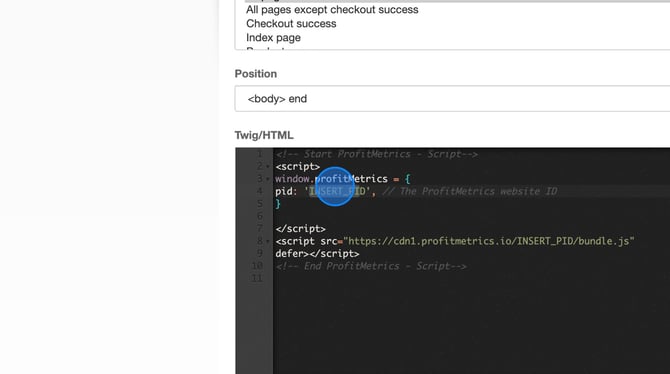
7. Click **Save**
Part 4: Create a Product Feed
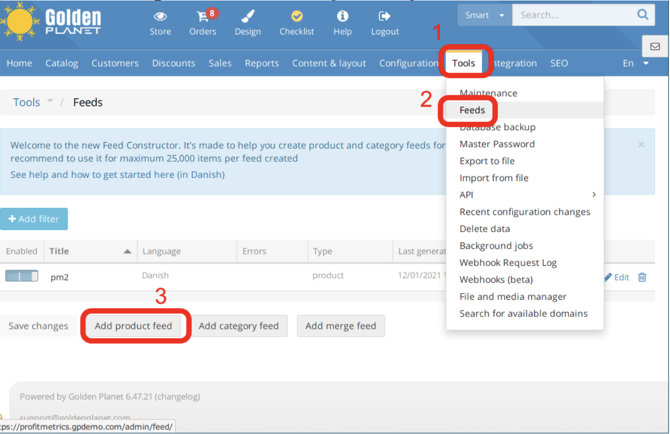
1. In the main menu, navigate to Tools – Feeds, and press ”Add product feed”
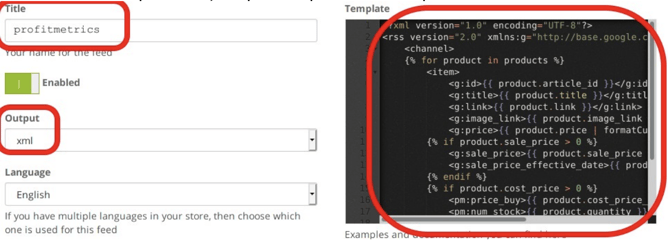
2. Fill in the title of the feed, we suggest ”profitmetrics”, set Output to ”xml”, delete the default contents of the ”Template” area, and paste the product feed template into it.
3. ```
{% for product in products %} - {{ product.article_id }} {{ product.title }} {{ product.link }} {{ product.image_link }} {{ product.price | formatCurrency }} {% if product.sale_price > 0 %} {{ product.sale_price | formatCurrency }} {{ product.sale_price_effective_date }} {% endif %} {% if product.cost_price > 0 %} {{ product.cost_price_no_tax | formatCurrency }} {{ product.quantity }} {% endif %}
{% endfor %}
```
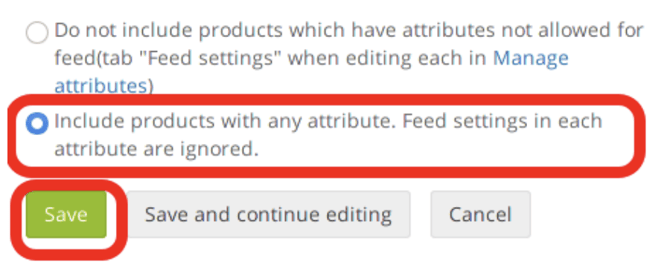
4. At the bottom of the form, select the option ”include products with any attribute. Feed settings in each attribute are ignored”, and click Save.
5. Rightclick on the ”Link” button and select ”Copy link address” to copy the url of the feed. You can now input this feed into your account on ProfitMetrics

- [Getting Started](https://knowledge.profitmetrics.io/getting-started?hsLang=en#main-content)
- [Learn the Basics](https://knowledge.profitmetrics.io/getting-started?hsLang=en#learn-the-basics)
- [Prepare for Onboarding](https://knowledge.profitmetrics.io/getting-started?hsLang=en#prepare-for-onboarding)
- [Account Setup](https://knowledge.profitmetrics.io/getting-started?hsLang=en#account-setup)
- [E-commerce Platforms](https://knowledge.profitmetrics.io/e-commerce-platforms?hsLang=en#main-content)
- [Shopify](https://knowledge.profitmetrics.io/e-commerce-platforms?hsLang=en#shopify)
- [WooCommerce](https://knowledge.profitmetrics.io/e-commerce-platforms?hsLang=en#woocommerce)
- [Magento](https://knowledge.profitmetrics.io/e-commerce-platforms?hsLang=en#magento)
- [PrestaShop](https://knowledge.profitmetrics.io/e-commerce-platforms?hsLang=en#prestashop)
- [BigCommerce](https://knowledge.profitmetrics.io/e-commerce-platforms?hsLang=en#bigcommerce)
- [Shopware](https://knowledge.profitmetrics.io/e-commerce-platforms?hsLang=en#shopware)
- [DanDomain & Related](https://knowledge.profitmetrics.io/e-commerce-platforms?hsLang=en#dandomain-related)
- [Universal Integration (Clientside)](https://knowledge.profitmetrics.io/e-commerce-platforms?hsLang=en#universal-integration-clientside)
- [Universal Integration (Server-side Hybrid)](https://knowledge.profitmetrics.io/e-commerce-platforms?hsLang=en#universal-integration-server-side-hybrid)
- [Other Platforms](https://knowledge.profitmetrics.io/e-commerce-platforms?hsLang=en#other-platforms)
- [Developer Documentation](https://knowledge.profitmetrics.io/e-commerce-platforms?hsLang=en#developer-documentation)
- [Ad Channels](https://knowledge.profitmetrics.io/ad-channels?hsLang=en#main-content)
- [Google Ads](https://knowledge.profitmetrics.io/ad-channels?hsLang=en#google-ads)
- [Meta (Facebook/Instagram)](https://knowledge.profitmetrics.io/ad-channels?hsLang=en#meta-facebook-instagram)
- [Microsoft Bing Ads](https://knowledge.profitmetrics.io/ad-channels?hsLang=en#microsoft-bing-ads)
- [Google Analytics 4](https://knowledge.profitmetrics.io/ad-channels?hsLang=en#google-analytics-4)
- [Partner-ads](https://knowledge.profitmetrics.io/ad-channels?hsLang=en#partner-ads)
- [Other Channel Configuration](https://knowledge.profitmetrics.io/ad-channels?hsLang=en#other-channel-configuration)
- [Tracking & Conversion Setup](https://knowledge.profitmetrics.io/tracking-conversion-setup?hsLang=en#main-content)
- [Overview](https://knowledge.profitmetrics.io/tracking-conversion-setup?hsLang=en#overview)
- [Conversion Booster for Google Ads](https://knowledge.profitmetrics.io/tracking-conversion-setup?hsLang=en#conversion-booster-for-google-ads)
- [Conversion Booster for Meta](https://knowledge.profitmetrics.io/tracking-conversion-setup?hsLang=en#conversion-booster-for-meta)
- [Conversion Booster Custom Pixels](https://knowledge.profitmetrics.io/tracking-conversion-setup?hsLang=en#conversion-booster-custom-pixels)
- [Enhanced Conversions](https://knowledge.profitmetrics.io/tracking-conversion-setup?hsLang=en#enhanced-conversions)
- [Shopping Booster](https://knowledge.profitmetrics.io/shopping-booster?hsLang=en#main-content)
- [Overview & Setup](https://knowledge.profitmetrics.io/shopping-booster?hsLang=en#overview-setup)
- [Supplemental Feeds](https://knowledge.profitmetrics.io/shopping-booster?hsLang=en#supplemental-feeds)
- [Campaigns & Labels](https://knowledge.profitmetrics.io/shopping-booster?hsLang=en#campaigns-labels)
- [Troubleshooting](https://knowledge.profitmetrics.io/shopping-booster?hsLang=en#troubleshooting)
- [Product Feed & Costs](https://knowledge.profitmetrics.io/product-feed-costs?hsLang=en#main-content)
- [Product Feed](https://knowledge.profitmetrics.io/product-feed-costs?hsLang=en#product-feed)
- [Shipping & Payment Costs](https://knowledge.profitmetrics.io/product-feed-costs?hsLang=en#shipping-payment-costs)
- [Expenses](https://knowledge.profitmetrics.io/product-feed-costs?hsLang=en#expenses)
- [Dashboard, Orders & Reporting](https://knowledge.profitmetrics.io/dashboard-orders-reporting?hsLang=en#main-content)
- [Dashboard & Orders](https://knowledge.profitmetrics.io/dashboard-orders-reporting?hsLang=en#dashboard-orders)
- [Looker Studio](https://knowledge.profitmetrics.io/dashboard-orders-reporting?hsLang=en#looker-studio)
- [Google BigQuery](https://knowledge.profitmetrics.io/dashboard-orders-reporting?hsLang=en#google-bigquery)
- [Account & Billing](https://knowledge.profitmetrics.io/account-billing?hsLang=en#main-content)
- [Users & Access](https://knowledge.profitmetrics.io/account-billing?hsLang=en#users-access)
- [Billing & Invoices](https://knowledge.profitmetrics.io/account-billing?hsLang=en#billing-invoices)
- [Privacy & Consent](https://knowledge.profitmetrics.io/privacy-consent?hsLang=en#main-content)
- [GDPR](https://knowledge.profitmetrics.io/privacy-consent?hsLang=en#gdpr)
- [Consent Management Platforms](https://knowledge.profitmetrics.io/privacy-consent?hsLang=en#consent-management-platforms)
- [Google Consent Mode](https://knowledge.profitmetrics.io/privacy-consent?hsLang=en#google-consent-mode)
- [For Agencies](https://knowledge.profitmetrics.io/for-agencies?hsLang=en#main-content)
- [Getting Started as an Agency](https://knowledge.profitmetrics.io/for-agencies?hsLang=en#getting-started-as-an-agency)
- [Agency Certification](https://knowledge.profitmetrics.io/for-agencies?hsLang=en#agency-certification)
- [Shopify](https://knowledge.profitmetrics.io/shopify?hsLang=en)
- [PrestaShop](https://knowledge.profitmetrics.io/prestashop?hsLang=en)
- [Google Ads](https://knowledge.profitmetrics.io/google-ads?hsLang=en#main-content)
- [troubleshoot](https://knowledge.profitmetrics.io/google-ads?hsLang=en#troubleshoot)
- [Meta (Facebook / Instagram)](https://knowledge.profitmetrics.io/meta-facebook-instagram?hsLang=en)
- [Uncategorized](https://knowledge.profitmetrics.io/uncategorized?hsLang=en)
- [Billing](https://knowledge.profitmetrics.io/billing?hsLang=en)
- [Google Sheets](https://knowledge.profitmetrics.io/google-sheets?hsLang=en)
- [Account](https://knowledge.profitmetrics.io/account?hsLang=en)
- [Ideal Shop](https://knowledge.profitmetrics.io/ideal-shop?hsLang=en)
[](https://profitmetrics.io)
[mailto:support@profitmetrics.io](mailto:support@profitmetrics.io)
Copyright © 2026, ProfitMetrics ApS