---
title: How to integrate Dandomain Classic with ProfitMetrics
description: Follow these instructions to integrate DanDomain Classic and import your products automatically to ProfitMetrics
---
[Skip to content](https://knowledge.profitmetrics.io/how-to-integrate-dandomain-classic-with-profitmetrics#main-content)
[](https://knowledge.profitmetrics.io/?hsLang=en)
Open main navigation
Close main navigation
- [Contact Support](https://knowledge.profitmetrics.io/kb-ticket/new)
[Contact Support](https://knowledge.profitmetrics.io/kb-ticket/new?hsLang=en)
How can we help you?
- There are no suggestions because the search field is empty.
1. [Knowledge base](https://knowledge.profitmetrics.io/?hsLang=en)
2. [E-commerce Platforms](https://knowledge.profitmetrics.io/e-commerce-platforms?hsLang=en)
3. [DanDomain & Related](https://knowledge.profitmetrics.io/e-commerce-platforms?hsLang=en#dandomain-related)
# How to integrate Dandomain Classic with ProfitMetrics
## Follow these instructions to integrate DanDomain Classic and import your products automatically to ProfitMetrics
---
[Part 1: DanDomain Classic Integration Setup](https://knowledge.profitmetrics.io/how-to-integrate-dandomain-classic-with-profitmetrics#part1)
[Part 2: Install the ProfitMetrics Script](https://knowledge.profitmetrics.io/how-to-integrate-dandomain-classic-with-profitmetrics#part2)
[Part 3: Install the setEmail Script](https://knowledge.profitmetrics.io/how-to-integrate-dandomain-classic-with-profitmetrics#part3)
---
**NOTE**: If the screens here don't match what you see, confirm whether you are on Dandomain Classic or Dandomain, as the instructions are different. For Dandomain, please follow the instructions in [ProfitMetrics Integrations](https://my.profitmetrics.io/customer/integrations_ssw_hybrid.php?b=dandomain)
---
### Part 1: DanDomain Classic Integration Setup
1. Once you have created your [business account](https://knowledge.profitmetrics.io/how-to-create-a-business-account?hsLang=en) and added your first [website](https://knowledge.profitmetrics.io/how-to-add-your-first-website?hsLang=en), click [here](https://my.profitmetrics.io/customer/integrations_dandomain_hybrid.php) to start the integration setup for DanDomain Classic.
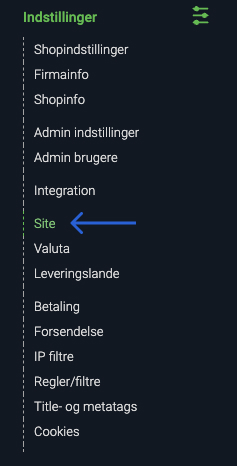
2. In a new tab open DanDomain and go to "**Indstillinger**" -\> "**Site**"
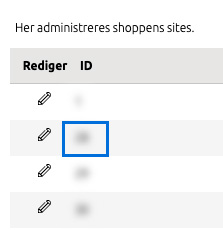
3. Copy the DanDomain site ID from the "**ID**" column in the overview
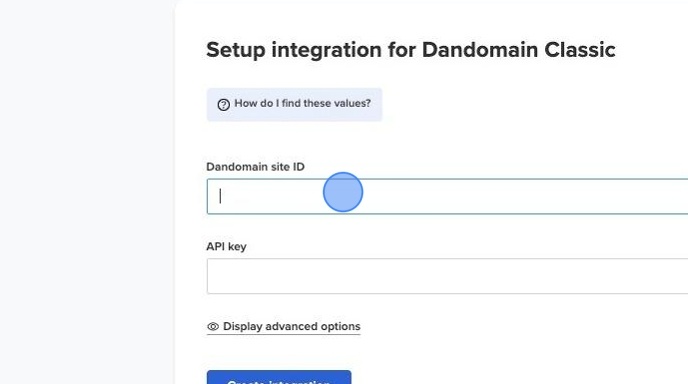
4. Add the "**DanDomain site ID**" in ProfitMetrics
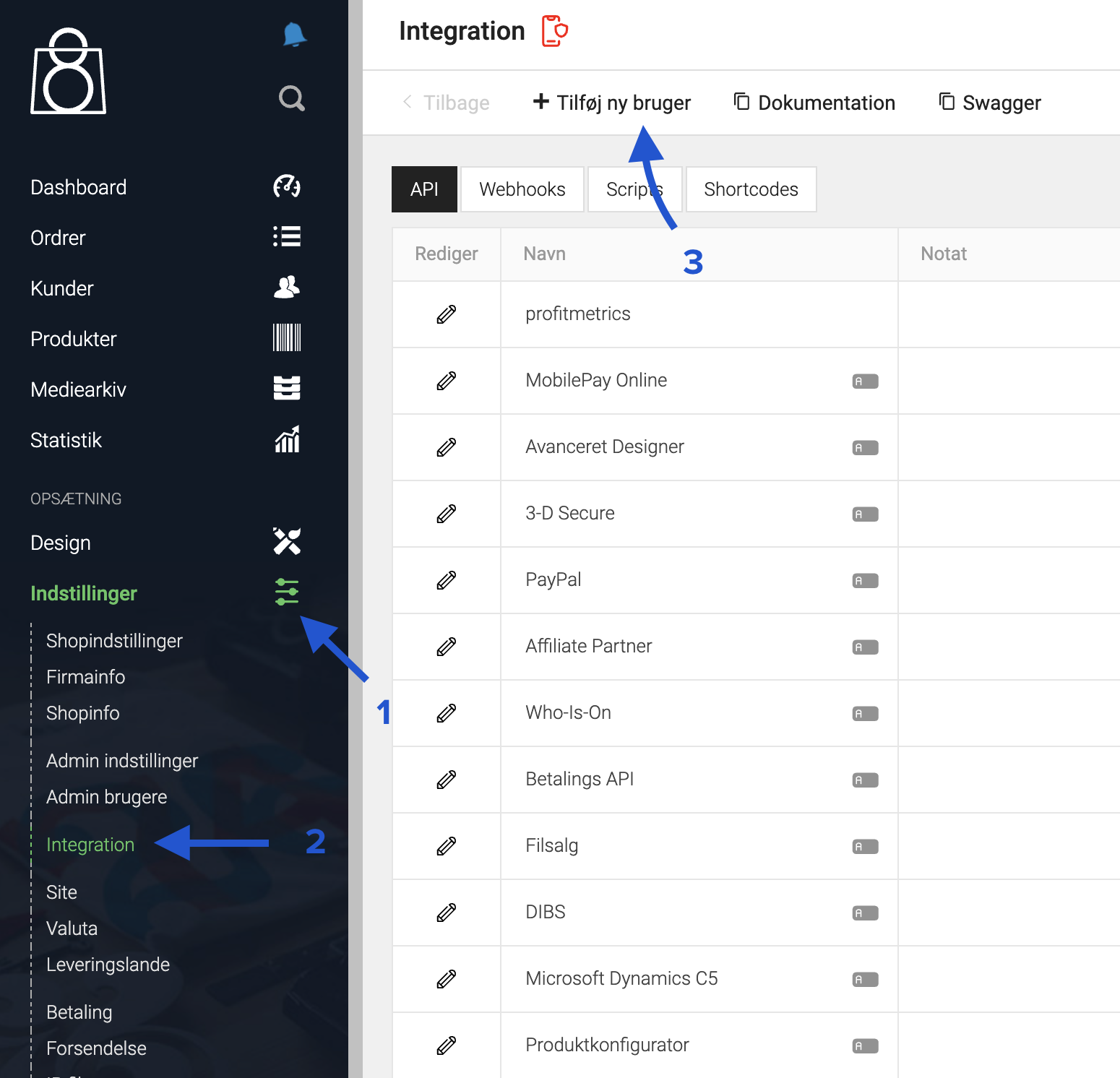
5. To find your API key, go to "**Indstillinger**" \> "**Integration**" then click "**Tilføj ny burger**"
****
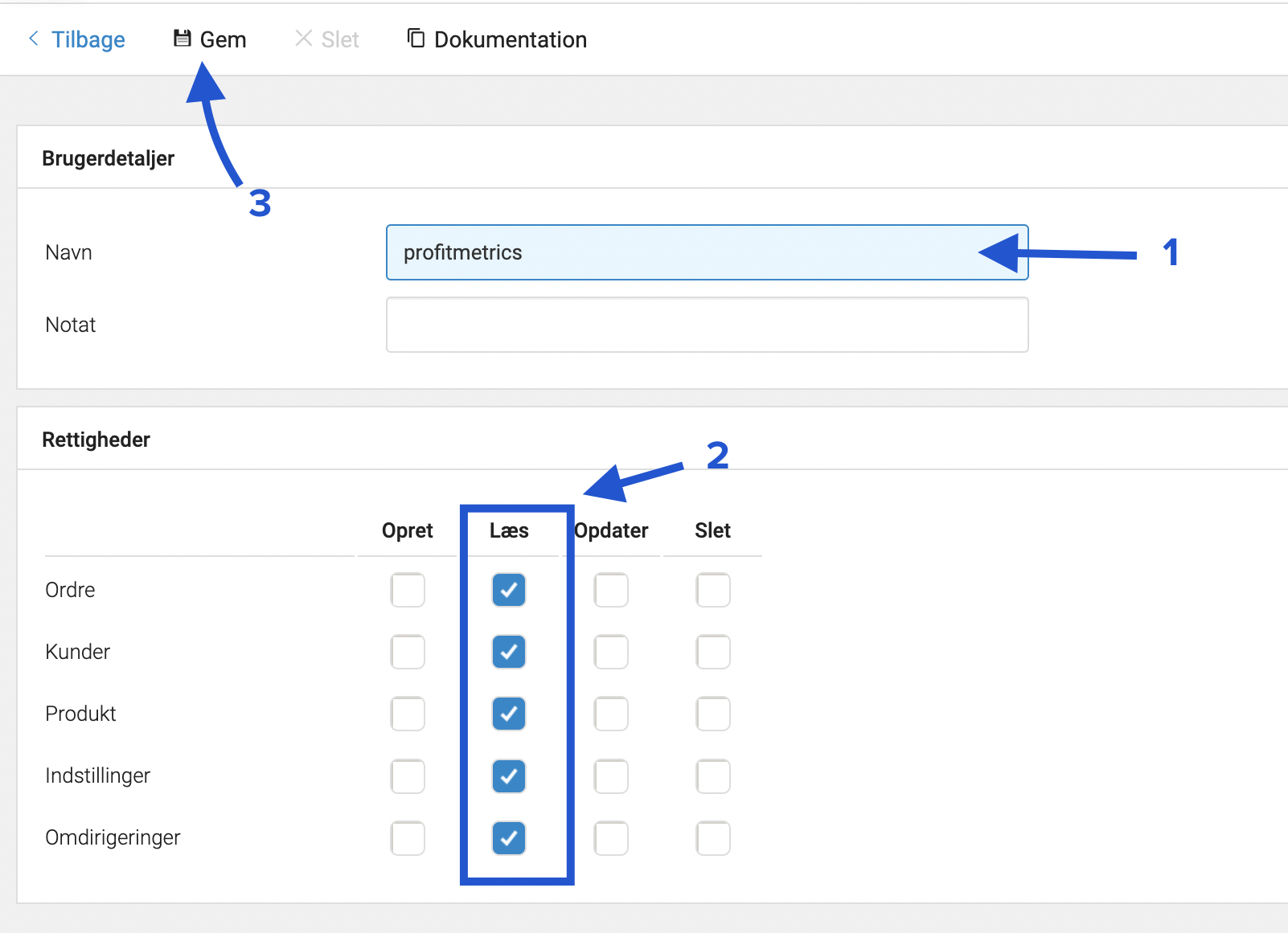
6. Enter a name for the user and **enable all read rights,** then click "**Gem**"
*(the name of the user can be anything)*
****
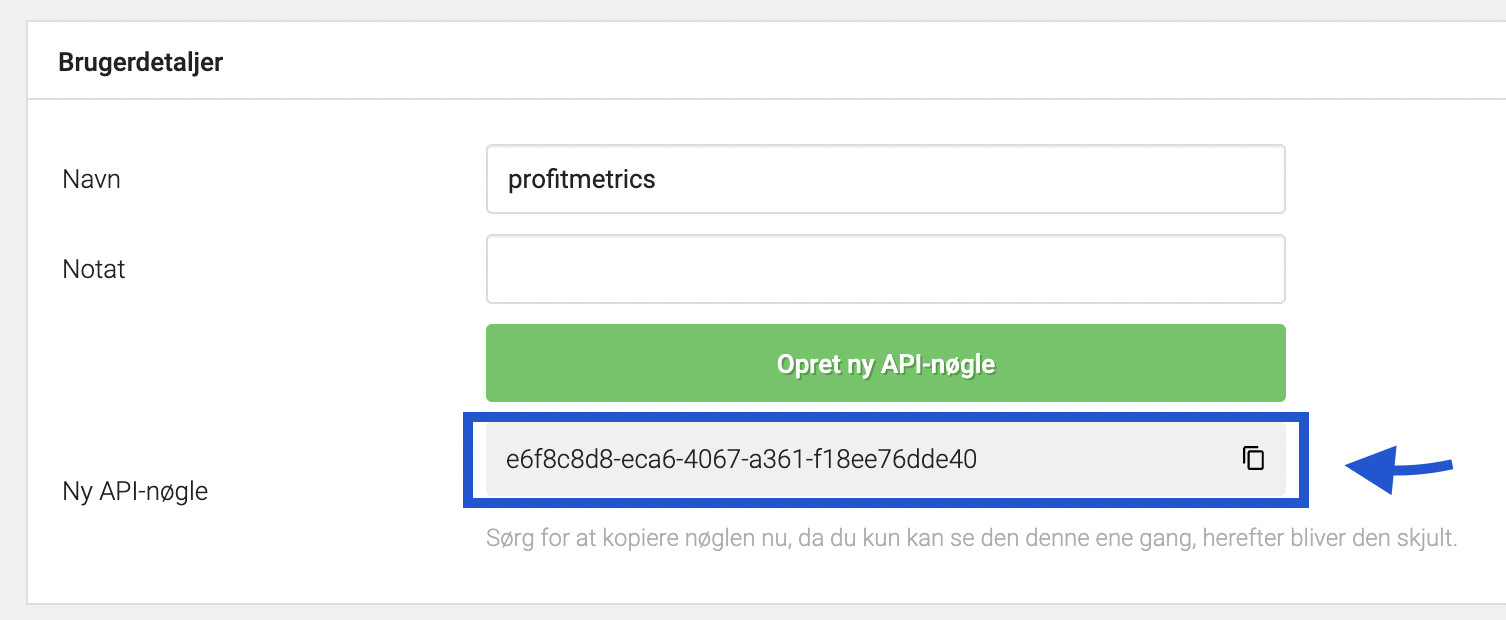
7. Copy the API key from Dandomain
****
8. Add the API key in ProfitMetrics
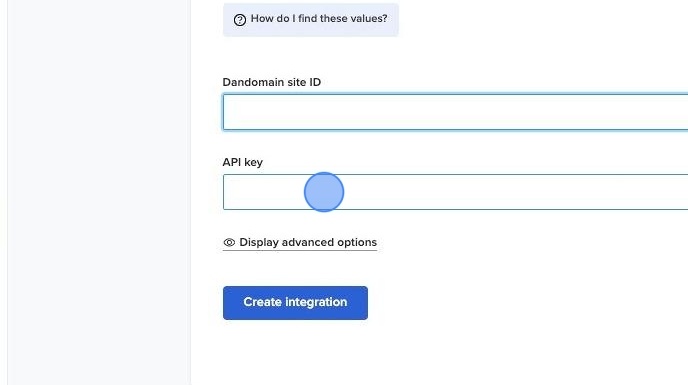
9. Click "**Create Integration**"
.png?width=688&height=385&name=Profitmetrics%20Workflow%20-%20Step%203%20(2).png)
### Part 2: Install the ProfitMetrics Scipt
1. Copy this Snippet and remember to replace both instances of PUBLIC\_ID with the Public ID of your [website](https://my.profitmetrics.io/customer/websites.php) in ProfitMetrics
```
```
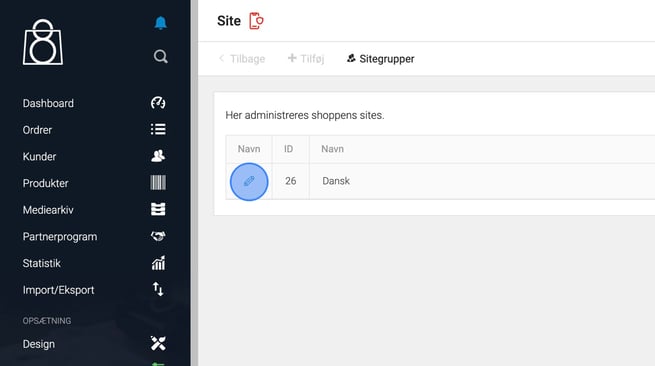
2. Click **"Indstillinger"**

3. Click "**Site"**

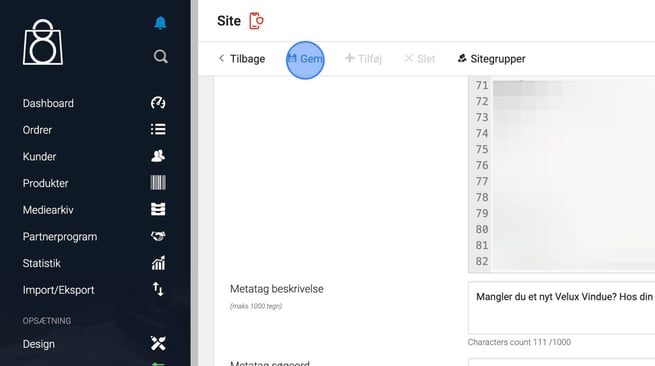
4. Click the "**Edit/Pencil"** icon for the site you want to edit.
5. Insert the script at the bottom of **"Kodefelter (head section)"**
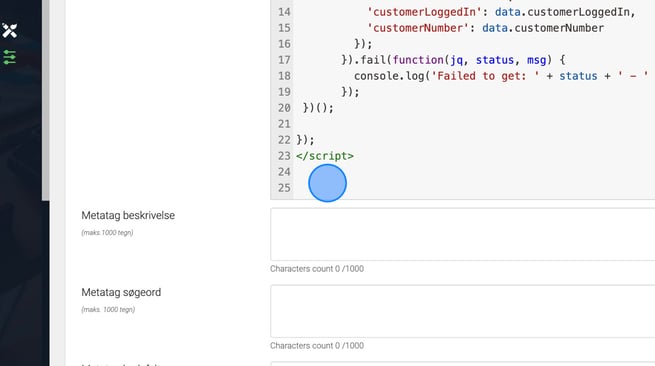
6. Click "**Gem"** to save the change
### Part 3: Install the setEmail Script
1. Copy this snippet
```
```
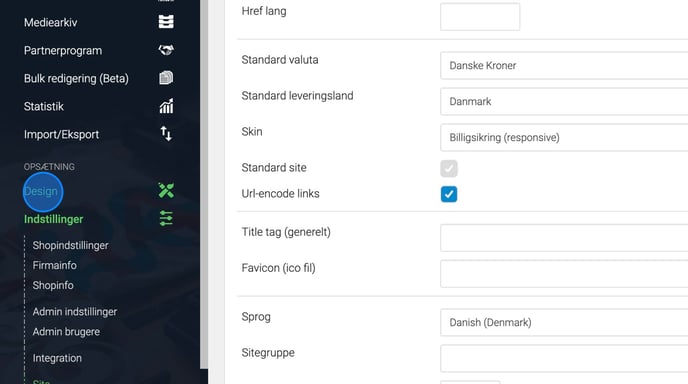
2. Click **"Design"
**
3. Click **"Tekster/Knapper"
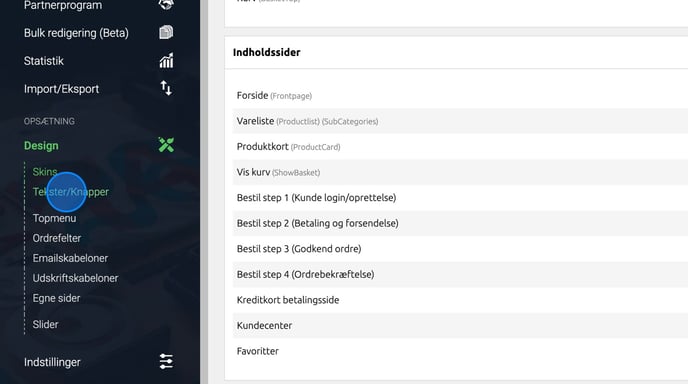**
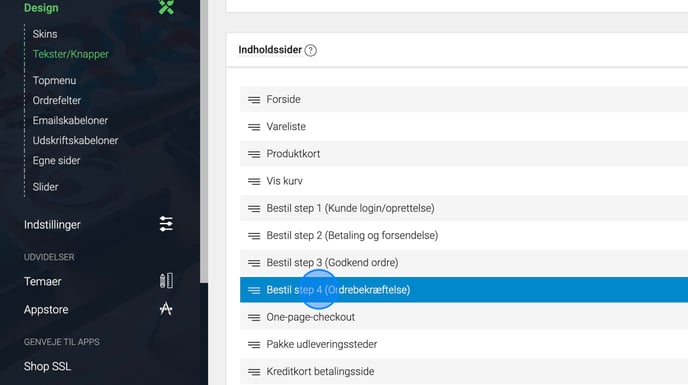
4. Click **"Bestil step 4 (Ordrebekræftelse)
**
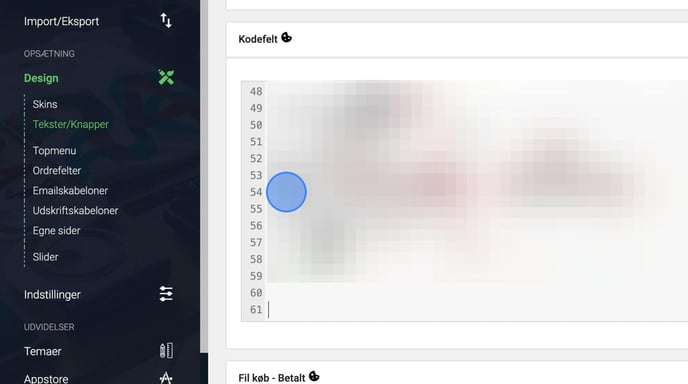
5. Paste the snippet at the bottom of **"Kodefelt"
**
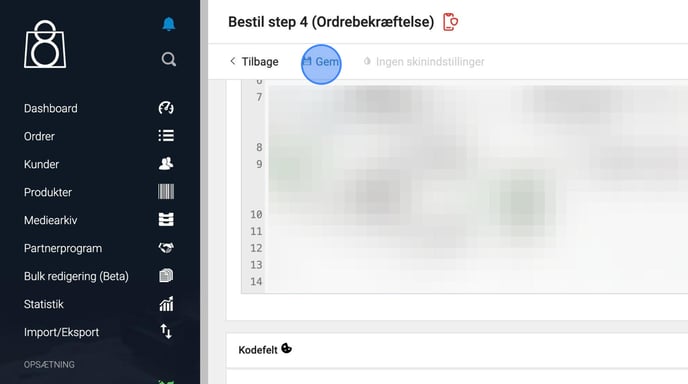
6. Click **"Gem"
**
### **Part 4: Import Your Product**
Our module will automatically generate a product feed containing cost prices and import them into Profitmetrics.
If you don't have cost prices in DanDomain, you can create a separate product feed and set it up according to our specifications. [Click here to read our Product Feed Specification](https://knowledge.profitmetrics.io/how-to-create-a-product-feed-for-profitmetrics?hsLang=en).
1\. In ProfitMetrics, navigate to "**Products**" -\> "**[Product Feed](https://my.profitmetrics.io/customer/products_feed.php)**"
2\. Type "**dandomain**" in the URL field
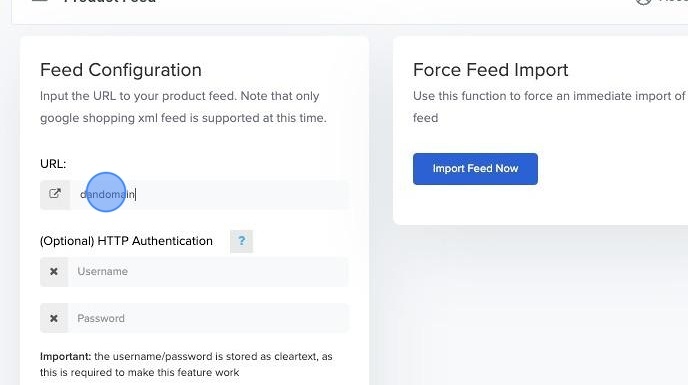
3\. Select the fetch interval \> click "**Save Feed Configuration**"
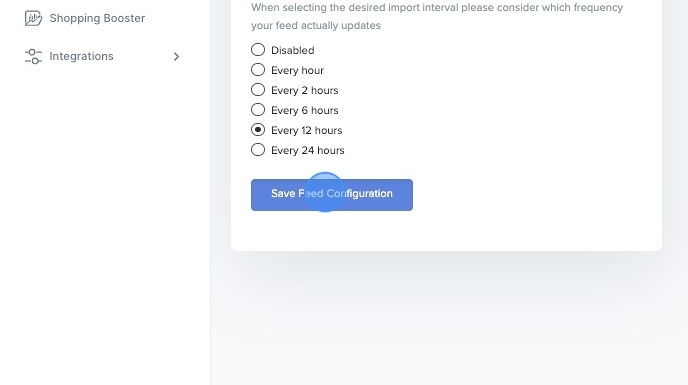
4\. Click "**OK**"
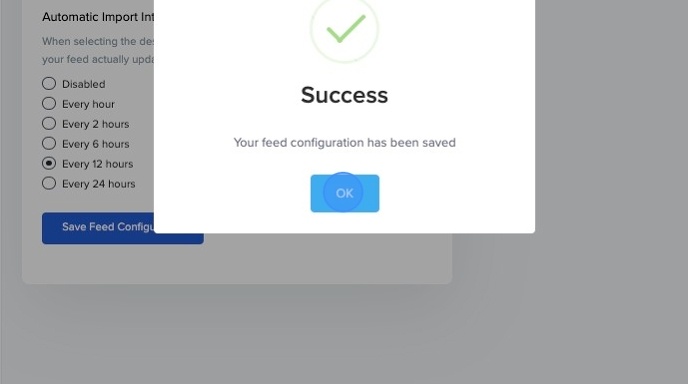
5\. Click "**Import Feed Now**"
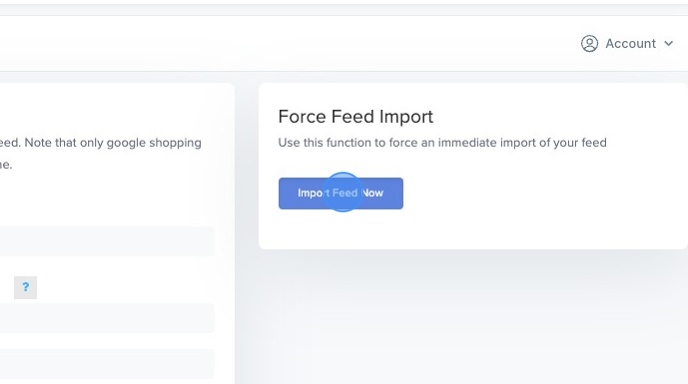
6\. Click "**OK**"
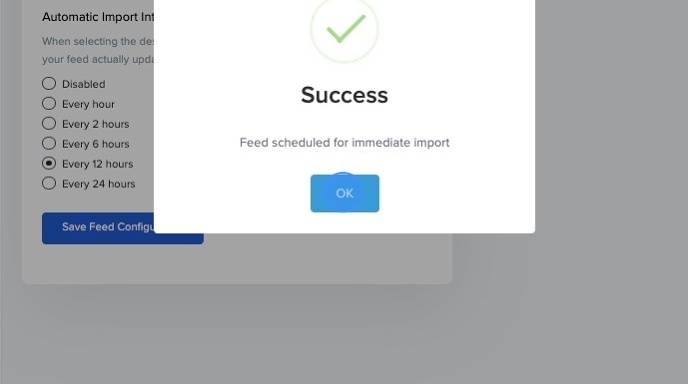
7\. Done ✅
[Take me to the next step](https://knowledge.profitmetrics.io/steps-to-take-before-onboarding-session?hsLang=en)
- [Getting Started](https://knowledge.profitmetrics.io/getting-started?hsLang=en#main-content)
- [Learn the Basics](https://knowledge.profitmetrics.io/getting-started?hsLang=en#learn-the-basics)
- [Prepare for Onboarding](https://knowledge.profitmetrics.io/getting-started?hsLang=en#prepare-for-onboarding)
- [Account Setup](https://knowledge.profitmetrics.io/getting-started?hsLang=en#account-setup)
- [E-commerce Platforms](https://knowledge.profitmetrics.io/e-commerce-platforms?hsLang=en#main-content)
- [Shopify](https://knowledge.profitmetrics.io/e-commerce-platforms?hsLang=en#shopify)
- [WooCommerce](https://knowledge.profitmetrics.io/e-commerce-platforms?hsLang=en#woocommerce)
- [Magento](https://knowledge.profitmetrics.io/e-commerce-platforms?hsLang=en#magento)
- [PrestaShop](https://knowledge.profitmetrics.io/e-commerce-platforms?hsLang=en#prestashop)
- [BigCommerce](https://knowledge.profitmetrics.io/e-commerce-platforms?hsLang=en#bigcommerce)
- [Shopware](https://knowledge.profitmetrics.io/e-commerce-platforms?hsLang=en#shopware)
- [DanDomain & Related](https://knowledge.profitmetrics.io/e-commerce-platforms?hsLang=en#dandomain-related)
- [Universal Integration (Clientside)](https://knowledge.profitmetrics.io/e-commerce-platforms?hsLang=en#universal-integration-clientside)
- [Universal Integration (Server-side Hybrid)](https://knowledge.profitmetrics.io/e-commerce-platforms?hsLang=en#universal-integration-server-side-hybrid)
- [Other Platforms](https://knowledge.profitmetrics.io/e-commerce-platforms?hsLang=en#other-platforms)
- [Developer Documentation](https://knowledge.profitmetrics.io/e-commerce-platforms?hsLang=en#developer-documentation)
- [Ad Channels](https://knowledge.profitmetrics.io/ad-channels?hsLang=en#main-content)
- [Google Ads](https://knowledge.profitmetrics.io/ad-channels?hsLang=en#google-ads)
- [Meta (Facebook/Instagram)](https://knowledge.profitmetrics.io/ad-channels?hsLang=en#meta-facebook-instagram)
- [Microsoft Bing Ads](https://knowledge.profitmetrics.io/ad-channels?hsLang=en#microsoft-bing-ads)
- [Google Analytics 4](https://knowledge.profitmetrics.io/ad-channels?hsLang=en#google-analytics-4)
- [Partner-ads](https://knowledge.profitmetrics.io/ad-channels?hsLang=en#partner-ads)
- [Other Channel Configuration](https://knowledge.profitmetrics.io/ad-channels?hsLang=en#other-channel-configuration)
- [Tracking & Conversion Setup](https://knowledge.profitmetrics.io/tracking-conversion-setup?hsLang=en#main-content)
- [Overview](https://knowledge.profitmetrics.io/tracking-conversion-setup?hsLang=en#overview)
- [Conversion Booster for Google Ads](https://knowledge.profitmetrics.io/tracking-conversion-setup?hsLang=en#conversion-booster-for-google-ads)
- [Conversion Booster for Meta](https://knowledge.profitmetrics.io/tracking-conversion-setup?hsLang=en#conversion-booster-for-meta)
- [Conversion Booster Custom Pixels](https://knowledge.profitmetrics.io/tracking-conversion-setup?hsLang=en#conversion-booster-custom-pixels)
- [Enhanced Conversions](https://knowledge.profitmetrics.io/tracking-conversion-setup?hsLang=en#enhanced-conversions)
- [Shopping Booster](https://knowledge.profitmetrics.io/shopping-booster?hsLang=en#main-content)
- [Overview & Setup](https://knowledge.profitmetrics.io/shopping-booster?hsLang=en#overview-setup)
- [Supplemental Feeds](https://knowledge.profitmetrics.io/shopping-booster?hsLang=en#supplemental-feeds)
- [Campaigns & Labels](https://knowledge.profitmetrics.io/shopping-booster?hsLang=en#campaigns-labels)
- [Troubleshooting](https://knowledge.profitmetrics.io/shopping-booster?hsLang=en#troubleshooting)
- [Product Feed & Costs](https://knowledge.profitmetrics.io/product-feed-costs?hsLang=en#main-content)
- [Product Feed](https://knowledge.profitmetrics.io/product-feed-costs?hsLang=en#product-feed)
- [Shipping & Payment Costs](https://knowledge.profitmetrics.io/product-feed-costs?hsLang=en#shipping-payment-costs)
- [Expenses](https://knowledge.profitmetrics.io/product-feed-costs?hsLang=en#expenses)
- [Dashboard, Orders & Reporting](https://knowledge.profitmetrics.io/dashboard-orders-reporting?hsLang=en#main-content)
- [Dashboard & Orders](https://knowledge.profitmetrics.io/dashboard-orders-reporting?hsLang=en#dashboard-orders)
- [Looker Studio](https://knowledge.profitmetrics.io/dashboard-orders-reporting?hsLang=en#looker-studio)
- [Google BigQuery](https://knowledge.profitmetrics.io/dashboard-orders-reporting?hsLang=en#google-bigquery)
- [Account & Billing](https://knowledge.profitmetrics.io/account-billing?hsLang=en#main-content)
- [Users & Access](https://knowledge.profitmetrics.io/account-billing?hsLang=en#users-access)
- [Billing & Invoices](https://knowledge.profitmetrics.io/account-billing?hsLang=en#billing-invoices)
- [Privacy & Consent](https://knowledge.profitmetrics.io/privacy-consent?hsLang=en#main-content)
- [GDPR](https://knowledge.profitmetrics.io/privacy-consent?hsLang=en#gdpr)
- [Consent Management Platforms](https://knowledge.profitmetrics.io/privacy-consent?hsLang=en#consent-management-platforms)
- [Google Consent Mode](https://knowledge.profitmetrics.io/privacy-consent?hsLang=en#google-consent-mode)
- [For Agencies](https://knowledge.profitmetrics.io/for-agencies?hsLang=en#main-content)
- [Getting Started as an Agency](https://knowledge.profitmetrics.io/for-agencies?hsLang=en#getting-started-as-an-agency)
- [Agency Certification](https://knowledge.profitmetrics.io/for-agencies?hsLang=en#agency-certification)
- [Shopify](https://knowledge.profitmetrics.io/shopify?hsLang=en)
- [PrestaShop](https://knowledge.profitmetrics.io/prestashop?hsLang=en)
- [Google Ads](https://knowledge.profitmetrics.io/google-ads?hsLang=en#main-content)
- [troubleshoot](https://knowledge.profitmetrics.io/google-ads?hsLang=en#troubleshoot)
- [Meta (Facebook / Instagram)](https://knowledge.profitmetrics.io/meta-facebook-instagram?hsLang=en)
- [Uncategorized](https://knowledge.profitmetrics.io/uncategorized?hsLang=en)
- [Billing](https://knowledge.profitmetrics.io/billing?hsLang=en)
- [Google Sheets](https://knowledge.profitmetrics.io/google-sheets?hsLang=en)
- [Account](https://knowledge.profitmetrics.io/account?hsLang=en)
- [Ideal Shop](https://knowledge.profitmetrics.io/ideal-shop?hsLang=en)
[](https://profitmetrics.io)
[mailto:support@profitmetrics.io](mailto:support@profitmetrics.io)
Copyright © 2026, ProfitMetrics ApS