---
title: How to identify whether Meta is using Product ID or External SKU and configure ProfitMetrics Content ID
description: Product ID or External SKU for ProfitMetrics Meta integration
---
[Skip to content](https://knowledge.profitmetrics.io/how-to-identify-whether-meta-is-using-product-id-or-external-sku-and-configure-profitmetrics-content-id#main-content)
[](https://knowledge.profitmetrics.io/?hsLang=en)
Open main navigation
Close main navigation
- [Contact Support](https://knowledge.profitmetrics.io/kb-ticket/new)
[Contact Support](https://knowledge.profitmetrics.io/kb-ticket/new?hsLang=en)
How can we help you?
- There are no suggestions because the search field is empty.
1. [Knowledge base](https://knowledge.profitmetrics.io/?hsLang=en)
2. [Tracking & Conversion Setup](https://knowledge.profitmetrics.io/tracking-conversion-setup?hsLang=en)
3. [Conversion Booster for Meta](https://knowledge.profitmetrics.io/tracking-conversion-setup?hsLang=en#conversion-booster-for-meta)
# How to identify whether Meta is using Product ID or External SKU and configure ProfitMetrics Content ID
## Product ID or External SKU for ProfitMetrics Meta integration
#### [Part 1: Check the Content ID setting in ProfitMetrics](https://knowledge.profitmetrics.io/how-to-identify-whether-meta-is-using-product-id-or-external-sku-and-configure-profitmetrics-content-id#part1) [Part 2: Find Meta’s Content ID in Commerce Manager](https://knowledge.profitmetrics.io/how-to-identify-whether-meta-is-using-product-id-or-external-sku-and-configure-profitmetrics-content-id#part2) [Part 3: Locate the Content / Product ID Meta is being used](https://knowledge.profitmetrics.io/how-to-identify-whether-meta-is-using-product-id-or-external-sku-and-configure-profitmetrics-content-id#part3) [Part 4: Decide whether Meta is using Product ID or External SKU](https://knowledge.profitmetrics.io/how-to-identify-whether-meta-is-using-product-id-or-external-sku-and-configure-profitmetrics-content-id#part4) [Part 5: Update ProfitMetrics so it matches Meta](https://knowledge.profitmetrics.io/how-to-identify-whether-meta-is-using-product-id-or-external-sku-and-configure-profitmetrics-content-id#part5)
---
#### **Why this matters** Meta matches purchase events to your catalogue items using the catalogue Content ID. If ProfitMetrics sends a different identifier than the one used in your catalogue, Meta may struggle to match purchases to the correct products, which can impact Dynamic Product Ads, product-level reporting, and attribution.
#### **What you will confirm**
1. #### Which identifier ProfitMetrics is set to use as the Meta Content ID
2. #### Which identifier Meta is showing as Content ID in Commerce Manager
3. #### Whether those two values match
4. #### What to change if they do not match
#### **Part 1: Check the Content ID setting in ProfitMetrics**
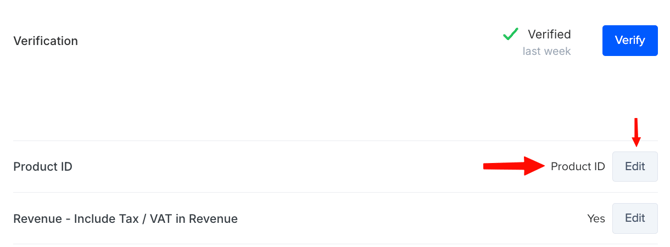
1. Go to "**Integrations**" \> "**Connections**" \> "**Conversion Booster for Meta**" then find **Product ID \>** and click "**Edit**"
****
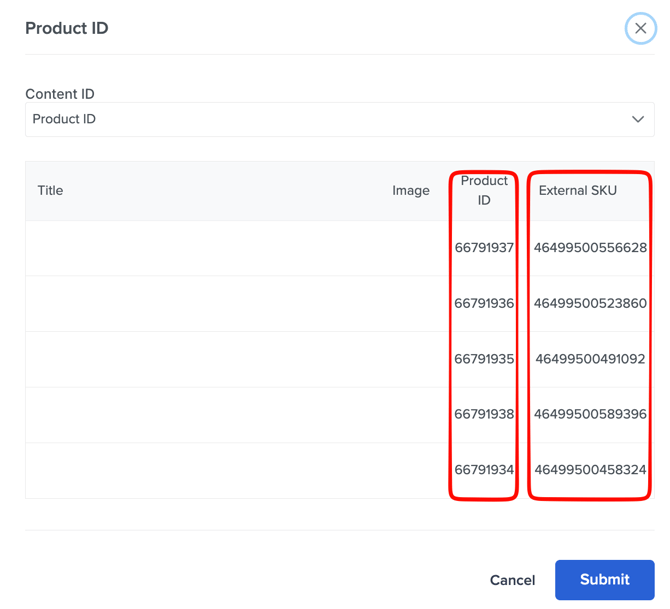
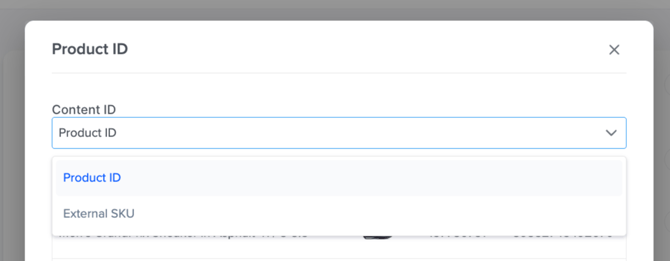
2. Identify what ProfitMetrics will send as "**Content ID**" to Meta Ads. Choose "**External SKU**" OR "**Product ID**"
#### **What this means:**
- "**Content ID**" is the identifier ProfitMetrics will use when sending product IDs to Meta in purchase events.
- The dropdown decides which column will be used as the outgoing identifier.
#### **Part 2: Find Meta’s Content ID in Commerce Manager**
1. Go to "**Meta Business Suite**"
2. Open "**Commerce Manager**"
3. Select the correct "**Catalog**"
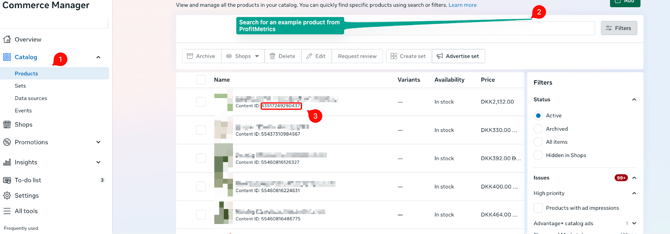
4. In the left menu, go to "**Catalog**"
5. Click "**Products**"
**Part 3: Locate the Content / Product ID Meta is being used**
1. In the product list, each product row shows a line called "**Content ID**" beneath the product name.
2. Copy one example "**Content ID**" from the list.
#### **Part 4: Decide whether Meta is using Product ID or External SKU**
Now compare the Meta Content ID to the two identifier types in ProfitMetrics.
#### How to interpret the result:
- If Meta’s Content ID looks like your "**Product ID**" column, Meta is using Product ID as the catalog key.
- If Meta’s Content ID looks like your "**External SKU**" column, Meta is using External SKU as the catalog key.
#### **Part 5: Update ProfitMetrics so it matches Meta**
Switch ProfitMetrics Content ID to the correct value
1. Go back to ProfitMetrics **Verification**
2. Open **Product ID**
3. Click **Edit**
4. Change **Content ID** from **Product ID** to **External SKU**
5. Click **Submit
**
Done ✅
- [Getting Started](https://knowledge.profitmetrics.io/getting-started?hsLang=en#main-content)
- [Learn the Basics](https://knowledge.profitmetrics.io/getting-started?hsLang=en#learn-the-basics)
- [Prepare for Onboarding](https://knowledge.profitmetrics.io/getting-started?hsLang=en#prepare-for-onboarding)
- [Account Setup](https://knowledge.profitmetrics.io/getting-started?hsLang=en#account-setup)
- [E-commerce Platforms](https://knowledge.profitmetrics.io/e-commerce-platforms?hsLang=en#main-content)
- [Shopify](https://knowledge.profitmetrics.io/e-commerce-platforms?hsLang=en#shopify)
- [WooCommerce](https://knowledge.profitmetrics.io/e-commerce-platforms?hsLang=en#woocommerce)
- [Magento](https://knowledge.profitmetrics.io/e-commerce-platforms?hsLang=en#magento)
- [PrestaShop](https://knowledge.profitmetrics.io/e-commerce-platforms?hsLang=en#prestashop)
- [BigCommerce](https://knowledge.profitmetrics.io/e-commerce-platforms?hsLang=en#bigcommerce)
- [Shopware](https://knowledge.profitmetrics.io/e-commerce-platforms?hsLang=en#shopware)
- [DanDomain & Related](https://knowledge.profitmetrics.io/e-commerce-platforms?hsLang=en#dandomain-related)
- [Universal Integration (Clientside)](https://knowledge.profitmetrics.io/e-commerce-platforms?hsLang=en#universal-integration-clientside)
- [Universal Integration (Server-side Hybrid)](https://knowledge.profitmetrics.io/e-commerce-platforms?hsLang=en#universal-integration-server-side-hybrid)
- [Other Platforms](https://knowledge.profitmetrics.io/e-commerce-platforms?hsLang=en#other-platforms)
- [Developer Documentation](https://knowledge.profitmetrics.io/e-commerce-platforms?hsLang=en#developer-documentation)
- [Ad Channels](https://knowledge.profitmetrics.io/ad-channels?hsLang=en#main-content)
- [Google Ads](https://knowledge.profitmetrics.io/ad-channels?hsLang=en#google-ads)
- [Meta (Facebook/Instagram)](https://knowledge.profitmetrics.io/ad-channels?hsLang=en#meta-facebook-instagram)
- [Microsoft Bing Ads](https://knowledge.profitmetrics.io/ad-channels?hsLang=en#microsoft-bing-ads)
- [Google Analytics 4](https://knowledge.profitmetrics.io/ad-channels?hsLang=en#google-analytics-4)
- [Partner-ads](https://knowledge.profitmetrics.io/ad-channels?hsLang=en#partner-ads)
- [Other Channel Configuration](https://knowledge.profitmetrics.io/ad-channels?hsLang=en#other-channel-configuration)
- [Tracking & Conversion Setup](https://knowledge.profitmetrics.io/tracking-conversion-setup?hsLang=en#main-content)
- [Overview](https://knowledge.profitmetrics.io/tracking-conversion-setup?hsLang=en#overview)
- [Conversion Booster for Google Ads](https://knowledge.profitmetrics.io/tracking-conversion-setup?hsLang=en#conversion-booster-for-google-ads)
- [Conversion Booster for Meta](https://knowledge.profitmetrics.io/tracking-conversion-setup?hsLang=en#conversion-booster-for-meta)
- [Conversion Booster Custom Pixels](https://knowledge.profitmetrics.io/tracking-conversion-setup?hsLang=en#conversion-booster-custom-pixels)
- [Enhanced Conversions](https://knowledge.profitmetrics.io/tracking-conversion-setup?hsLang=en#enhanced-conversions)
- [Shopping Booster](https://knowledge.profitmetrics.io/shopping-booster?hsLang=en#main-content)
- [Overview & Setup](https://knowledge.profitmetrics.io/shopping-booster?hsLang=en#overview-setup)
- [Supplemental Feeds](https://knowledge.profitmetrics.io/shopping-booster?hsLang=en#supplemental-feeds)
- [Campaigns & Labels](https://knowledge.profitmetrics.io/shopping-booster?hsLang=en#campaigns-labels)
- [Troubleshooting](https://knowledge.profitmetrics.io/shopping-booster?hsLang=en#troubleshooting)
- [Product Feed & Costs](https://knowledge.profitmetrics.io/product-feed-costs?hsLang=en#main-content)
- [Product Feed](https://knowledge.profitmetrics.io/product-feed-costs?hsLang=en#product-feed)
- [Shipping & Payment Costs](https://knowledge.profitmetrics.io/product-feed-costs?hsLang=en#shipping-payment-costs)
- [Expenses](https://knowledge.profitmetrics.io/product-feed-costs?hsLang=en#expenses)
- [Dashboard, Orders & Reporting](https://knowledge.profitmetrics.io/dashboard-orders-reporting?hsLang=en#main-content)
- [Dashboard & Orders](https://knowledge.profitmetrics.io/dashboard-orders-reporting?hsLang=en#dashboard-orders)
- [Looker Studio](https://knowledge.profitmetrics.io/dashboard-orders-reporting?hsLang=en#looker-studio)
- [Google BigQuery](https://knowledge.profitmetrics.io/dashboard-orders-reporting?hsLang=en#google-bigquery)
- [Account & Billing](https://knowledge.profitmetrics.io/account-billing?hsLang=en#main-content)
- [Users & Access](https://knowledge.profitmetrics.io/account-billing?hsLang=en#users-access)
- [Billing & Invoices](https://knowledge.profitmetrics.io/account-billing?hsLang=en#billing-invoices)
- [Privacy & Consent](https://knowledge.profitmetrics.io/privacy-consent?hsLang=en#main-content)
- [GDPR](https://knowledge.profitmetrics.io/privacy-consent?hsLang=en#gdpr)
- [Consent Management Platforms](https://knowledge.profitmetrics.io/privacy-consent?hsLang=en#consent-management-platforms)
- [Google Consent Mode](https://knowledge.profitmetrics.io/privacy-consent?hsLang=en#google-consent-mode)
- [For Agencies](https://knowledge.profitmetrics.io/for-agencies?hsLang=en#main-content)
- [Getting Started as an Agency](https://knowledge.profitmetrics.io/for-agencies?hsLang=en#getting-started-as-an-agency)
- [Agency Certification](https://knowledge.profitmetrics.io/for-agencies?hsLang=en#agency-certification)
- [Shopify](https://knowledge.profitmetrics.io/shopify?hsLang=en)
- [PrestaShop](https://knowledge.profitmetrics.io/prestashop?hsLang=en)
- [Google Ads](https://knowledge.profitmetrics.io/google-ads?hsLang=en#main-content)
- [troubleshoot](https://knowledge.profitmetrics.io/google-ads?hsLang=en#troubleshoot)
- [Meta (Facebook / Instagram)](https://knowledge.profitmetrics.io/meta-facebook-instagram?hsLang=en)
- [Uncategorized](https://knowledge.profitmetrics.io/uncategorized?hsLang=en)
- [Billing](https://knowledge.profitmetrics.io/billing?hsLang=en)
- [Google Sheets](https://knowledge.profitmetrics.io/google-sheets?hsLang=en)
- [Account](https://knowledge.profitmetrics.io/account?hsLang=en)
- [Ideal Shop](https://knowledge.profitmetrics.io/ideal-shop?hsLang=en)
[](https://profitmetrics.io)
[mailto:support@profitmetrics.io](mailto:support@profitmetrics.io)
Copyright © 2026, ProfitMetrics ApS