
When you add ProfitMetrics tracking parameters (via a final URL suffix, tracking template, or directly in URL parameters), the following values are passed into your final URL:
-
pm_source → The advertising platform name (e.g. meta, google, tiktok).
-
pm_campaign_id → The campaign ID from the ad platform (e.g. 63746352).
-
pm_adgroup_id → The ad group ID from the ad platform (e.g. 7288467).
-
pm_ad_id → The ad ID from the ad platform (e.g. 9374628).
-
pmg → The Google Click ID (gclid) or Microsoft Click ID (msclkid).
These parameters power the ProfitMetrics Attribution Dashboard, ensuring each order is correctly linked to the channel, campaign/ad set, and ad. Set them once at the highest practical level (e.g. account or campaign) so all lower levels automatically inherit them.
About the pmg parameter
ProfitMetrics also adds the gclid or msclkid into the pmg parameter, alongside the standard gclid= or msclkid= values automatically applied by auto-tagging.
This provides a safeguard in cases where browsers strip tracking parameters from URLs (for example, in Safari Private Browsing. With pmg, attribution can still work even if the original gclid or msclkid is removed.
How to find the tracking parameters in ProfitMetrics
Google Ads
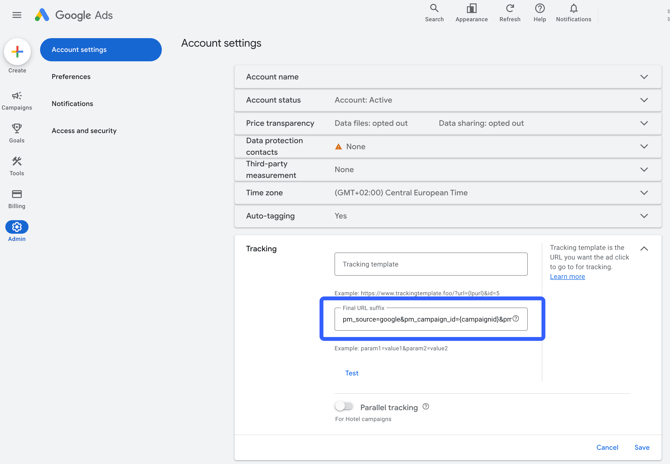
Where: How to add a Final URL suffix
Final URL suffix:
pm_source=google&pm_campaign_id={campaignid}&pm_adgroup_id={adgroupid}&pm_ad_id={creative}&pmg={gclid}
The below example shows how the final URL suffix can be added at account level (recommended)
Microsoft Ads (Bing)
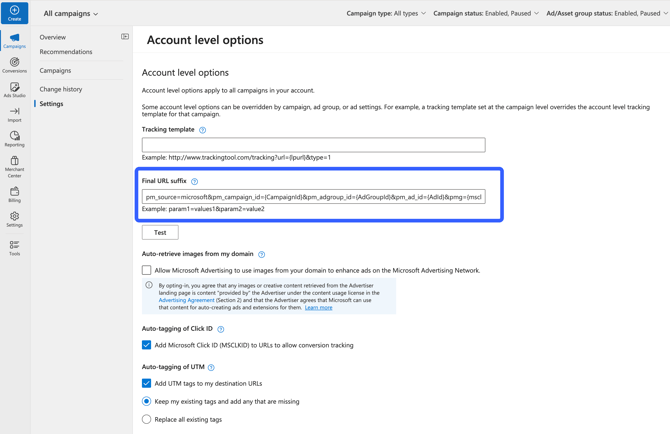
Where: Campaigns > Settings > Account level options
Final URL suffix:
pm_source=microsoft&pm_campaign_id={CampaignId}&pm_adgroup_id={AdGroupId}&pm_ad_id={AdId}&pmg={msclkid}
Meta (Facebook & Instagram)
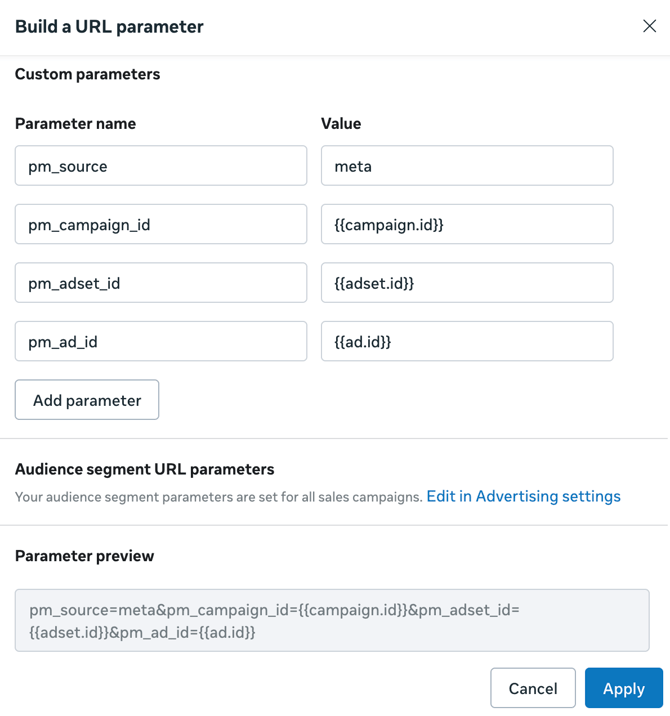
Where: Ad-level URL Parameters field.
URL paretmeters:
pm_source=meta&pm_campaign_id=&pm_adset_id=&pm_ad_id=
Or alternatively, add the parameters individually to the 'Build a URL parameter' section:
TikTok Ads
Where: Ad-level Build URL parameters → Custom parameters (click here for a guide)
Custom parameters:
pm_source=tiktok&pm_campaign_id=__CAMPAIGN_ID__&pm_adset_id=__AID__&pm_ad_id=__CID__
Pinterest Ads
Where: Campaign/Ad URL tracking / Parameter settings (or Ad “Destination link” → URL parameters). Click here for a guide
URL parameters:
pm_source=pinterest&pm_campaign_id={campaignid}&pm_adset_id={adgroupid}&pm_ad_id={adid}
Snapchat Ads
Where: Ad (or catalog link) URL → append macros / parameters (click here for a guide)
Parameters:
pm_source=snapchat&pm_campaign_id=&pm_adset_id=&pm_ad_id=